
 日本語
日本語 English
16Deza Table Cell Extras
Gutenberg標準テーブルブロックのセル内で使用できる書式を拡張する軽量プラグインです。(WordPress公式プラグイン)
お客様のサイト運営上、痒い所に手の届かない状態を何とかするために作成しました。もしよろしければご利用ください。
Latest version: 1.4.2 (2026-07-30)
== v1.4.2 ==修正:行と列の入れ替え機能において、rowspan や colspan が設定されたセルも正しく処理されるようになりました
== v1.4.1 ==
追加: セルの水平方向の配置設定(左寄せ / 中央揃え / 右寄せ。行・列・セル単位で設定可能)— 垂直方向の配置設定と統合し、単一の「セル配置」インスペクターパネルにまとめました追加: 行間(line-height)のインライン書式設定(スライダー使用、範囲: 0.75~2.0、単位なし)変更: 「テキストサイズ」の名称を「フォントサイズ」に変更(WordPressコアのタイポグラフィ用語との整合性を確保)変更: フォントサイズ、行間、行間隔、インラインブロックの設定を単一の `<span>` 要素に統合 — 複数のプロパティを同時に適用しても span 要素が入れ子にならないように変更変更: 行間隔の設定を、上下の値を調整できるスライダーパネルを備えた単一のツールバーボタンに変更(範囲: 0~2.0em)。既存のコンテンツとの後方互換性を維持変更: スライダーパネル(フォントサイズ、行間、行間隔)の背景を半透明化 — 値の調整中も背後のテキストが視認できるように変更削除: 水平スクロール機能 — WordPressコアがすでに `.wp-block-table` に対して `overflow-x: auto` を適用しているため、この機能は不要となりました
追加: セルの結合 — 方向と数を指定して、隣接するセルを水平方向 (colspan) または垂直方向 (rowspan) に結合== v1.4.0 ==
追加: セルの結合 — 方向と数を指定して、隣接するセルを水平方向 (colspan) または垂直方向 (rowspan) に結合
追加: セルの分割 — 結合されたセル (colspan/rowspan) を個々のセルに分割
修正: エディターを再読み込みした後、セルの最小幅設定が保持されない問題を修正
== v1.3.2 ==
追加: セルの境界線設定(行、列、またはセル単位)
追加: スライダーによるセルの最小幅設定(3~20em)
追加: 垂直方向の配置設定(行、列、またはセル単位)
追加: 狭い画面での水平スクロール機能
追加: 行と列の入れ替え機能
== v1.3.1 ==
修正: 疑似リスト (箇条書き) の bullet 位置
統合: 2つのCSSをひとつに (HTTP リクエスト軽減)
== v1.3.0 ==改善: テキストサイズ 0.75em から 2.0em まで調整可能 (スライダーパネル使用)
追加: 先頭列を td から th に変換可能に
追加: セルの背景色を [行ごと] [列ごと] [セル個別] に設定可能に
追加: 選択範囲のインラインブロック化
設定: テーブルブロック外でもインライン拡張書式を使用可能にするオプションを追加

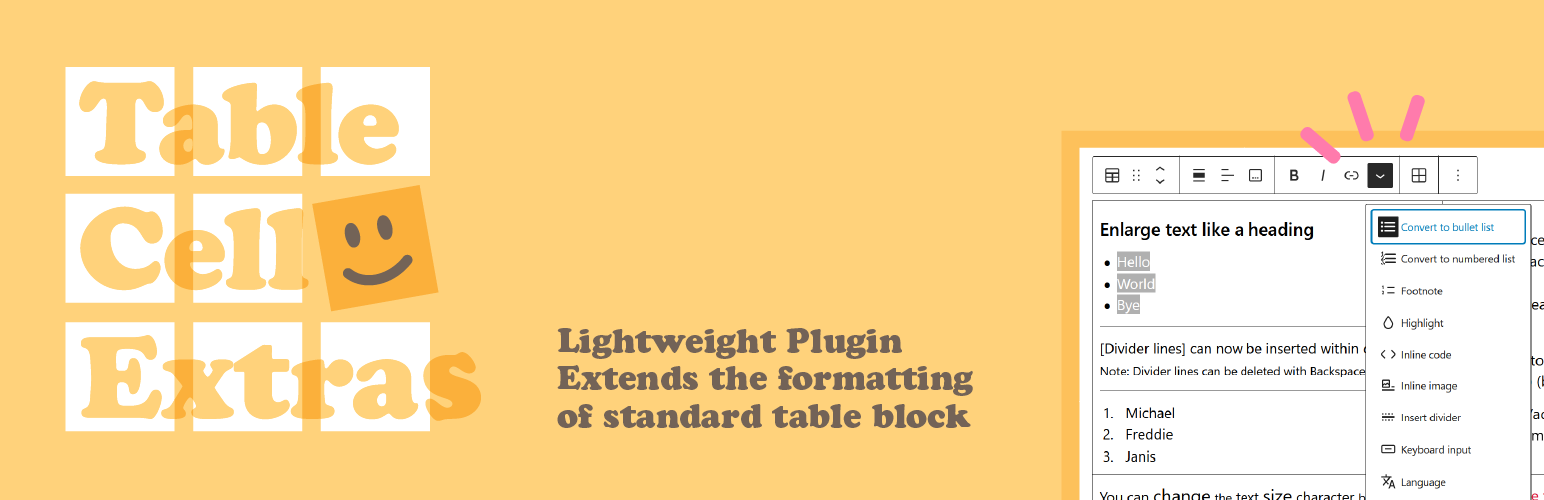
This is a lightweight plugin that extends formatting within the cells of standard Gutenberg table blocks. (WordPress official plugin)
I created this out of necessity for managing a customer’s website. Please feel free to download and use it if you wish.
Latest version: 1.4.2 ( July 30, 2026 )
== v1.4.2 ==
Fixed: Transpose table (swap rows and columns) now correctly handles cells with rowspan or colspan
== v1.4.1 ==
Added: Cell merge — merge adjacent cells horizontally (colspan) or vertically (rowspan) by specifying direction and countAdded: Cell horizontal alignment control (Left / Center / Right, per row / column / cell) — combined with vertical alignment into a single “Cell Alignment” inspector panelAdded: Line height inline format with slider (0.75–2.0, unitless)Changed: “Text size” renamed to “Font size” to align with WordPress core Typography terminologyChanged: Font size, line height, row spacing, and inline block now share a single unified `<span>` element — no nested spans when multiple properties are applied simultaneouslyChanged: Row spacing redesigned as a single toolbar button with a combined top / bottom slider panel (range 0–2.0em); backward-compatible with existing contentChanged: Slider panels (Font size, Line height, Row spacing) now have a semi-transparent background so the underlying text remains visible while adjusting valuesRemoved: Horizontal scroll feature — WordPress core already applies `overflow-x: auto` to `.wp-block-table`, making this feature redundant== v1.4.0 ==
Added: Cell merge — merge adjacent cells horizontally (colspan) or vertically (rowspan) by specifying direction and count
Added: Cell split — split a merged cell (colspan/rowspan) back into individual cells
Fixed: Cell minimum width setting was not persisted after editor reload
== v1.3.2 ==
Added: Cell border control (per-row, per-column, or per-cell)
Added: Cell minimum width control with a slider (3–20em)
Added: Vertical alignment control (per-row, per-column, or per-cell)
Added: Horizontal scrolling for narrow screens
Added: Row/column transposition
== v1.3.1 ==
Fixed pseudo-list bullet position for multi-line text.
Merged editor-only CSS into frontend CSS to reduce HTTP requests.
== 1.3.0 ==
Improved: Text size can be adjusted from 0.75em to 2.0em (with slider panel).
Added the ability to convert first-column cells from <td> to <th>.
Added the ability to set background colors for cells, rows, or columns.
Added the ability to apply inline-block formatting to selected text.
Added an option to enable inline formatting tools outside of table blocks.
Why?
WordPress標準状態では、テーブルセル内にGUIで配せるのは「ほぼプレーンテキストだけ」に近く … メリハリをつける手段に乏しいです。太字、イタリック、文字色変更程度しかありません。またセル内では改段落もなく、行間(上下)スペースを空けるには br (Enter) での改行以外なし。
HTML編集モードを利用すれば、セル内に ul などのブロック要素を配して箇条書きをしたり、文字単位の大きさ制御、セルの結合、セルごとに背景色を付けたりもできます。しかしながら、多くの場合、お客様(ユーザー)にとってはハードルが高いものであり、運用上現実的ではありません。
カスタムブロックを使って、リッチなテーブルを挿入/編集可能にする素晴らしいプラグインは世に存在します(敬意)。しかしながら、既存の・標準のテーブルを見やすくしたいという時には使えなかったり、Too Much だったり …
In its default WordPress state, table cells can only contain “almost entirely plain text” via the GUI, offering limited options for adding emphasis or visual clarity. Bold, italics, and text color changes are the only options. Furthermore, there are no paragraph breaks within cells, and the only way to create vertical spacing is through line breaks using `br` (Enter).
Using HTML editing mode allows for features such as inserting block elements (like `<ul>`) within cells to create bulleted lists, controlling font size at the character level, merging cells, and applying individual background colors to cells. However, this presents a high barrier for customers and users, making it impractical for actual operations.
There are excellent plugins out there that use custom blocks to enable the insertion and editing of rich tables (with respect!). However, sometimes they aren’t suitable for simply making existing standard tables easier to read, or they are just too much…
So,
そこで🙂 当プラグインは
WordPress標準のテーブルセル内で指定可能な書式/装飾および、セルのコントロールを拡張します。
So, this plugin extends the formatting/decoration options and some cell controls within standard WordPress table cells.
使用例 1 (セル内の配置・書式)
催事のタイムテーブルなど、セルの中に書くことが多いときに便利です。
| 12:30 | 開場・受付開始 |
| 13:00 | 開会 司会: 山田太郎 (株式会社山田伝記) |
| 13:10 | 講師:田中棚子(風林大学文学部准教授) 演題 「風が吹けば桶屋が儲かる」 言い出しっぺは誰? バタフライエフェクト バターフライとの違い 桶屋は本当に儲かったのか 人間万事塞翁が馬 洋の東西を問わず似た諺があることなど、爆笑エピソードを交えて解説します。 |
| 14:10 | 休憩 |
| 14:20 | 講師: 吉田芳男 (特殊法人ェックス日本) 演題 「中抜きビジネスの真髄」 * この世は食うか食われるか 搾取する側に回れ 良心の呵責を無視せよ 他人の労働の上前を撥ねろ 人間万事塞翁が馬 これぞポジショントーク。”利権にこだわる” 吉田先生による目から鱗の講演です。 * 著書の即売会・握手会あり |
| 15:30 | 閉会 |
| 16:00 | 懇親会 (隣のコンビニイートインにて) |
使用例 2 (先頭列の td/th 変換)
先頭列を <th> として任意の背景色を設定できます。左列が見出しとなる表の作成時に便利です。
| 社名 | 株式会社凸凹電子 |
|---|---|
| 所在地 | 〒123-4567 ○○県凸凹市××町123 |
| Tel / Fax | Tel: 012-345-6789 / Fax: 012-345-6780 |
| 設立 | 1945年 (昭和20年) 12月 |
| 資本金 | 1,000万円 |
| 代表者名 | 山田 六郎 |
| 事業内容 | アプリケーション開発 PC/OA機器販売・保守 ITコンサルティング エンジニア派遣 |
使用例 3 (セルの結合、背景色、枠線)
複数のセルを結合できます。背景色、枠線も任意の設定が可能です。
| レベル | 項目 | 内容 |
| 初級 | 加速 | 車体のピッチングを感じながら適切なタイミングでシフトアップができる |
| 減速 | 速度に合ったギアでエンジンブレーキを使いながら減速ができる | |
| 制動 | フロントブレーキとリヤブレーキのバランスをコントロールしながら止まることができる | |
| 中級 | 急加速 | パワーバンドを維持しながらフロントのリフトを抑えつつスピードを乗せることができる |
| 急減速 | 短い距離でテンポよくブリッピングを行いながらコーナリングに適したギアまで落とせる | |
| 急制動 | フロントタイヤの制動力を最大限引き出しながらリヤに荷重してリフトを抑えられる | |
| 上級 | ウィリー | アクセル・クラッチ・体重移動でバランスポイントまでフロントタイヤを持ち上げ、その状態のまま走行できる |
| ストッピー | ブレーキングに体重移動を合わせてリアタイヤをリフトし、バランスを保ったままフロントタイヤのみで走行できる | |
| マックスターン (スタンディング) | ステップに立ち上がった状態でフロントブレーキを掛けながら後輪を空転させ、円や8の字のブラックマークを描く |
Example 1 (Alignment, Formatting)
It’s useful when you have a lot of text to write within the cells, like a timetable.
| 12:30 | Doors open / Registration begins |
| 13:00 | Opening Ceremony Moderator: Taro Yamada (Yamada Deeenki Co., Ltd.) |
| 13:10 | Lecturer: Tanako Tanaka (Associate Professor, Faculty of Letters, Furin University) Title: “A butterfly flapping in Brazil can cause a tornado in Texas.” Who says it first? The butterfly effect Difference from butter fry So, what was the weather like in Panama then? Every cloud has a silver lining The proverb will be explained with hilarious anecdotes, including the fact that similar proverbs exist in both the East and the West. |
| 14:10 | Break |
| 14:20 | Lecturer: Yoshio Yoshida (eXs Japan, General Incorporated Association) Title: “The Essence of Rent-seeking Business” * This World is Eat or Be Eaten Become the Exploiter Ignore Your Conscience Skimming off the Top of Others’ Labor Every cloud has a silver lining This is Position Talk. An eye-opening lecture by Professor Yoshida, who “clings to vested interests.” * Book Sales and Autograph Session Available |
| 15:30 | Closing Ceremony |
| 16:00 | Social Gathering (at the convenience store eat-in area next door) |
Example 2 (First-column td/th conversion)
You can set a custom background color for the first column, using it as a header. This is useful when creating tables such as company profiles.
| Company Name | FooBar Electronics Co.,Ltd |
|---|---|
| Location | Foo-123, Bar-city, Baz 123-4567, Japan |
| Tel / Fax | Tel: +81-12-345-6789 / Fax: +81-12-345-6780 |
| Established | December 1945 |
| Capital | 10 million yen |
| President | Yamada Rokuro |
| Business Overview | Application Development PC/Office Equipment Sales & Maintenance IT Consulting Engineer Dispatch |
Example 3 (Cell Merge, Background, Border)
You can merge multiple cells. Background colors and borders can also be configured.
| Level | Skill | Description |
| Beginner | Acceleration | Able to upshift at the appropriate timing while sensing the motorcycle’s pitching motion. |
| Deceleration | Able to slow down using engine braking while in the gear appropriate for the speed. | |
| Braking | Able to come to a stop while balancing the use of the front and rear brakes. | |
| Intermediate | Rapid Acceleration | Ability to build speed while keeping the engine in the power band and preventing the front wheel from lifting. |
| Rapid Deceleration | Ability to downshift to the gear suitable for cornering over a short distance, using rhythmic throttle blips. | |
| Emergency Braking | Ability to maximize front-tire braking force while shifting weight to the rear to prevent the rear wheel from lifting. | |
| Advanced | Wheelie | Able to lift the front tire to the balance point—using the throttle, clutch, and body weight—and ride in that position. |
| Stoppie | Able to lift the rear tire by combining braking with body weight shifting, and ride on the front tire alone while maintaining balance. | |
| Max Turn(Standing) | Able to spin the rear wheel while applying the front brake—with standing on the footpegs—to draw circle of black tire marks. |
機能・特徴
シンプル・軽量です。
- 先頭列 th/td 変換
- 行と列の入れ替え
- セル背景色 (行ごと/列ごと/セル個別)
- セルの結合 (colspan/rowspan)
- セル枠線 (行ごと/列ごと/セル個別)
- セル内の配置 (vertical/horizontal)
- セル最小幅の指定 (3~20em)
- テキストサイズ変更 (0.75~2.0倍)
- 疑似リスト変換 (箇条書き・番号付き)
- 区切り線の挿入
- 行間を空ける (0.1~2.0em)
- 行の高さ (0.75~2.0)
- オプション: テーブルブロック外での拡張書式利用
Functions, Features
Simple and lightweight.
- First-column td/th conversion
- Transpose table (swap rows and columns)
- Cell Background Color (individual cells, rows, or columns)
- Cell Merge (colspan/rowspan)
- Cell Border (individual cells, rows, or columns)
- Cell Alignment (vertical/horizontal)
- Cell Minimum Width (3 to 20em)
- Variable text size (0.75x to 2x)
- Pseudo-list conversion (bulleted and numbered lists)
- Inserting divider lines
- Row Spacing (0.1 to 2.0 em)
- Line Height (0.75 to 2.0)
- Option: Extended Formatting Outside Table Blocks
先頭列 th/td 変換
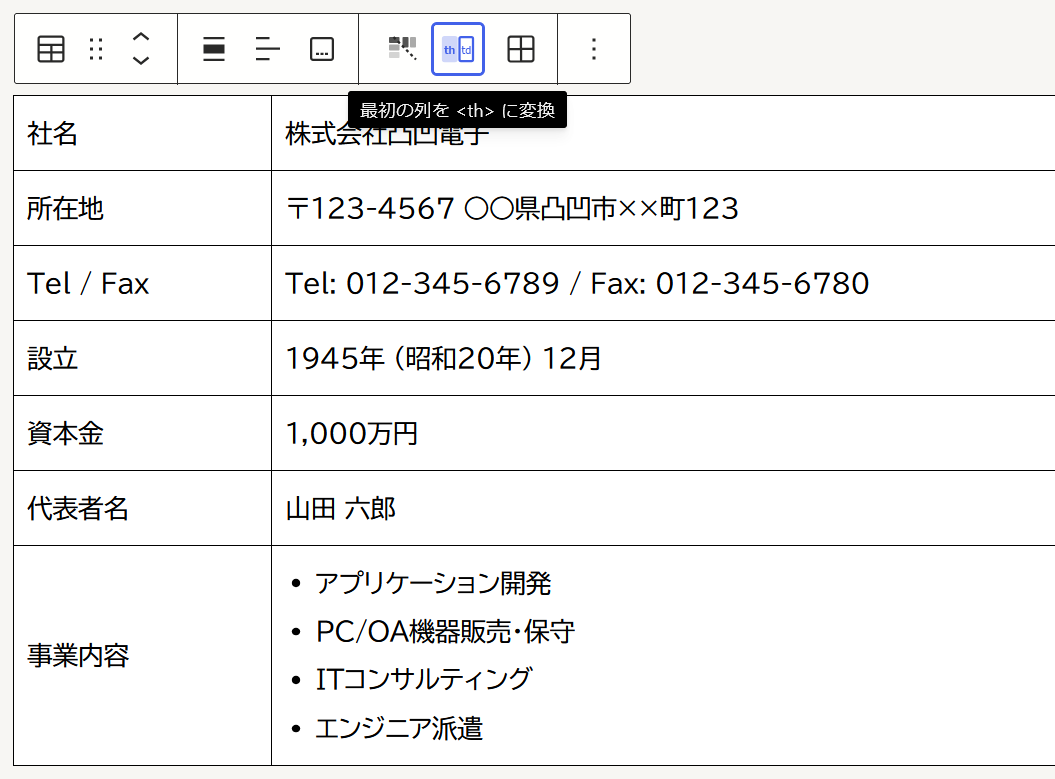
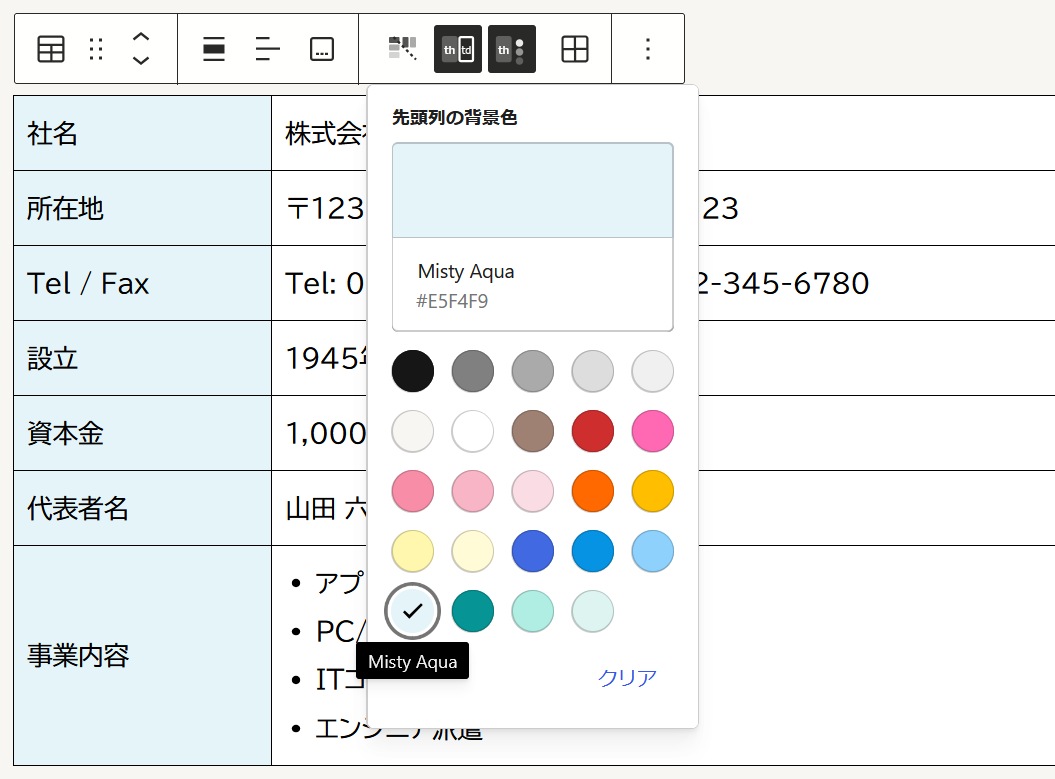
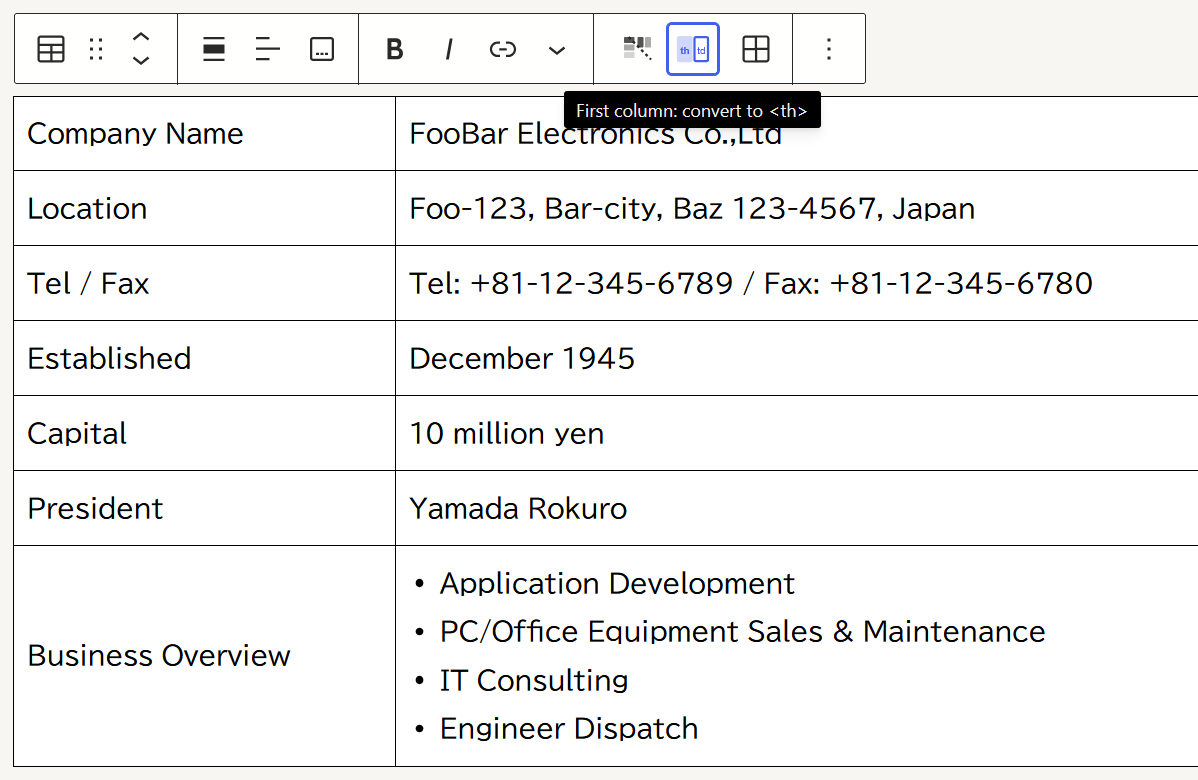
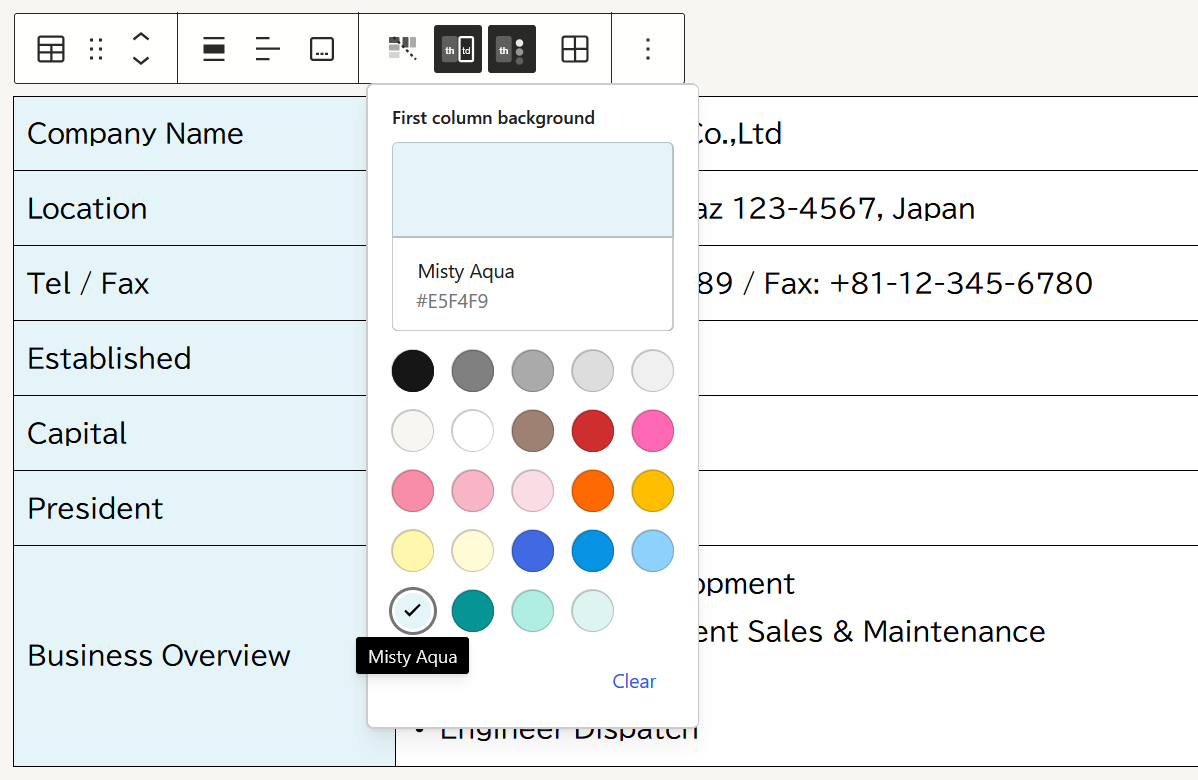
先頭列を td (table data) から th (table header) に変換できます。テーブルツールバー内、田んぼの田のアイコン左にある 「最初の列を th に変換」 ボタンを押す → テーマのカラーパレットが開き、背景色を指定できます。
First-column td/th conversion
You can convert the first column from `td` (table data) to `th` (table header). Clicking the “Convert First Column to th” button opens the theme color palette, allowing you to specify a background color.
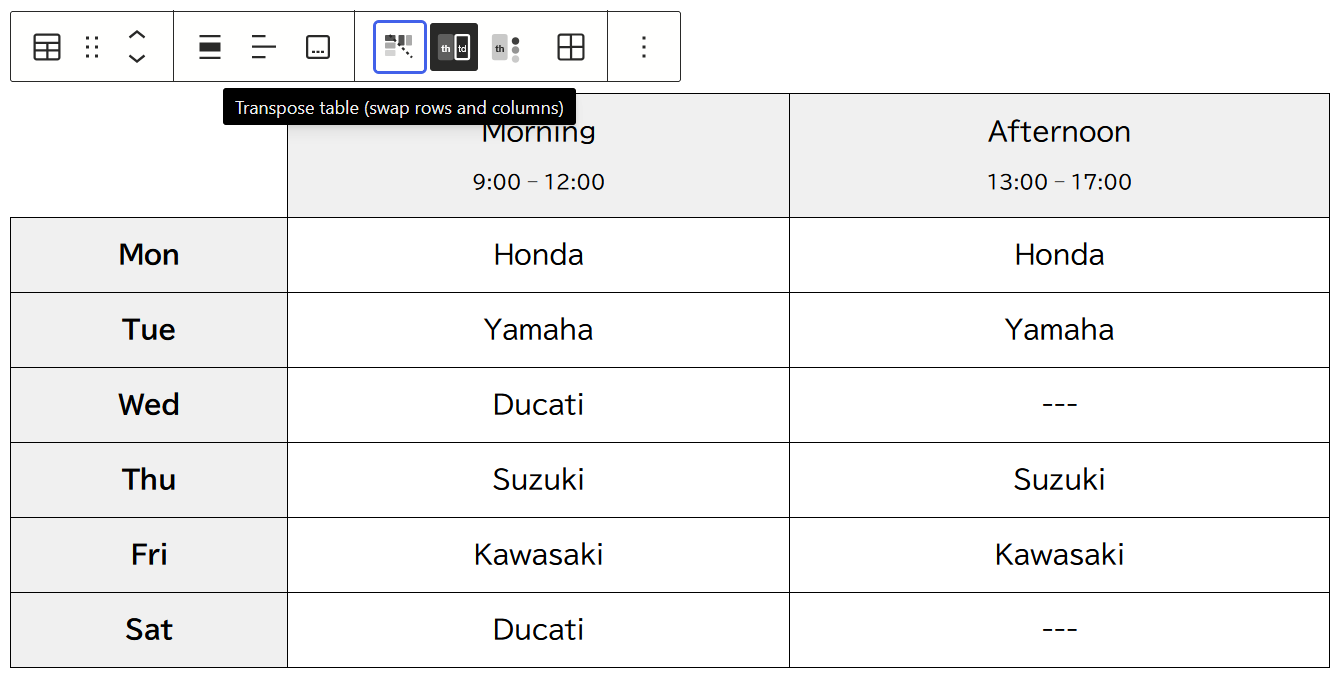
行と列の入れ替え
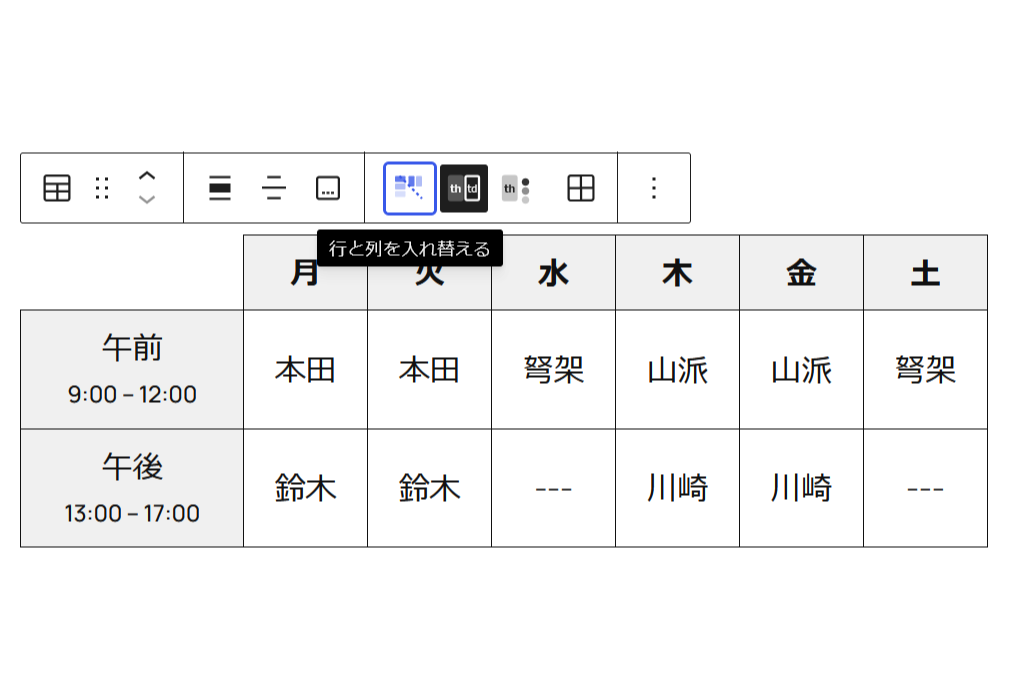
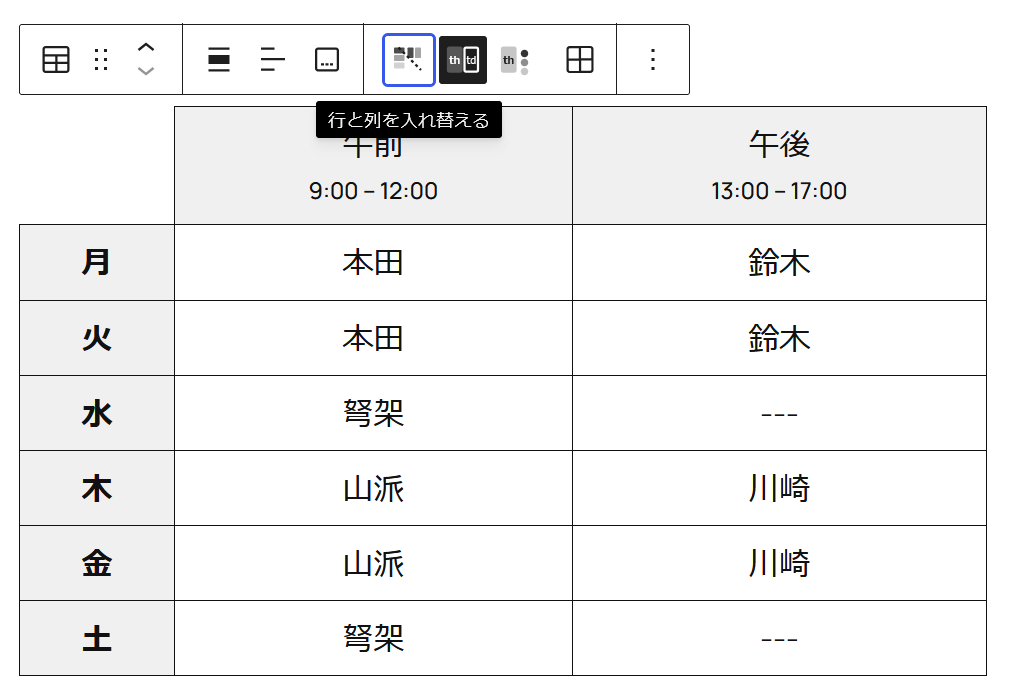
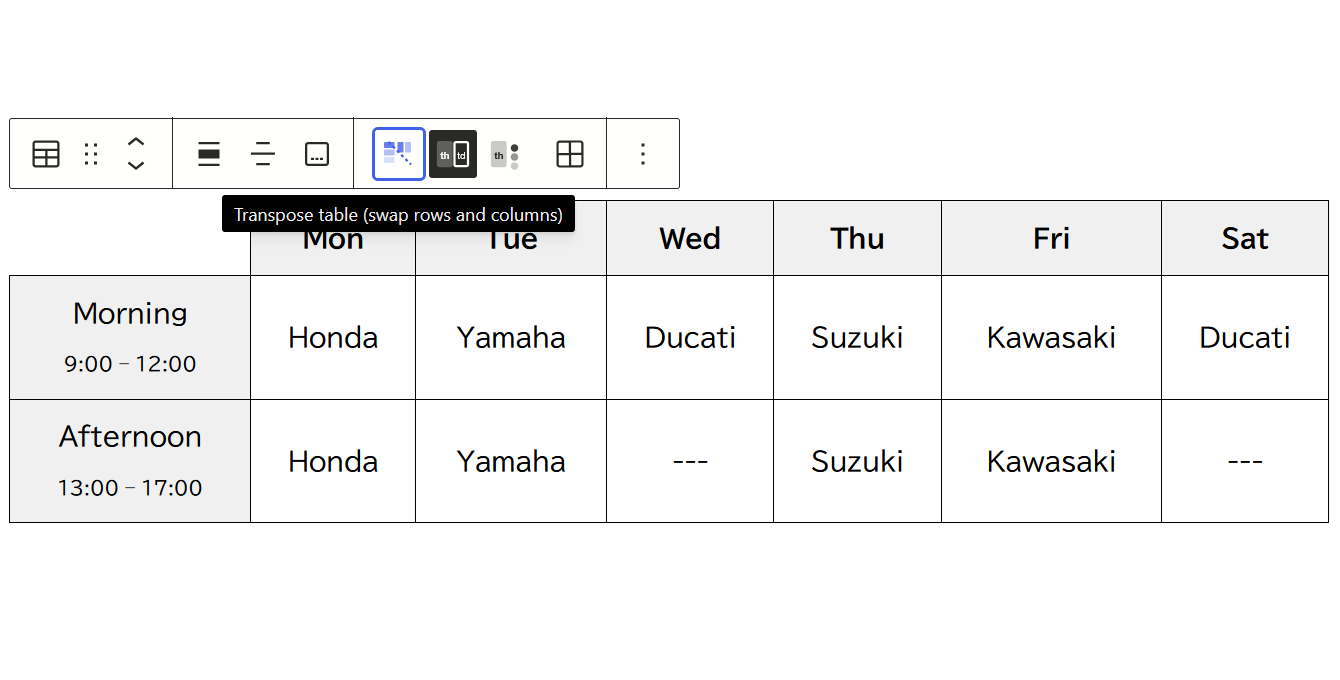
ボタン1つで簡単に行と列を入れ替えることができます。
Transpose table (swap rows and columns)
You can easily swap rows and columns with the click of a button.
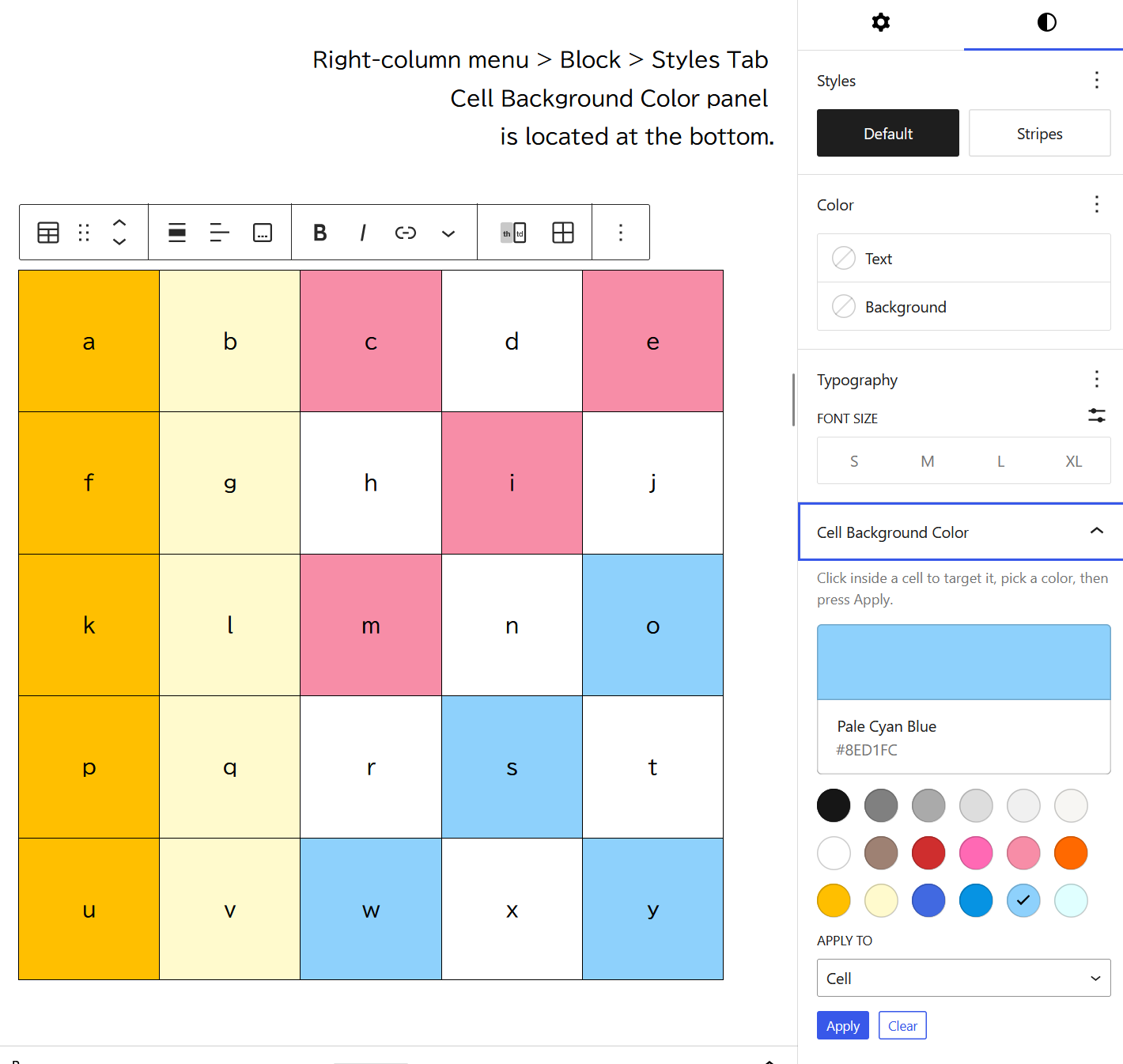
セル背景色
セルの背景色を 【行ごと】 【列ごと】 【セル個別】 に設定できます。
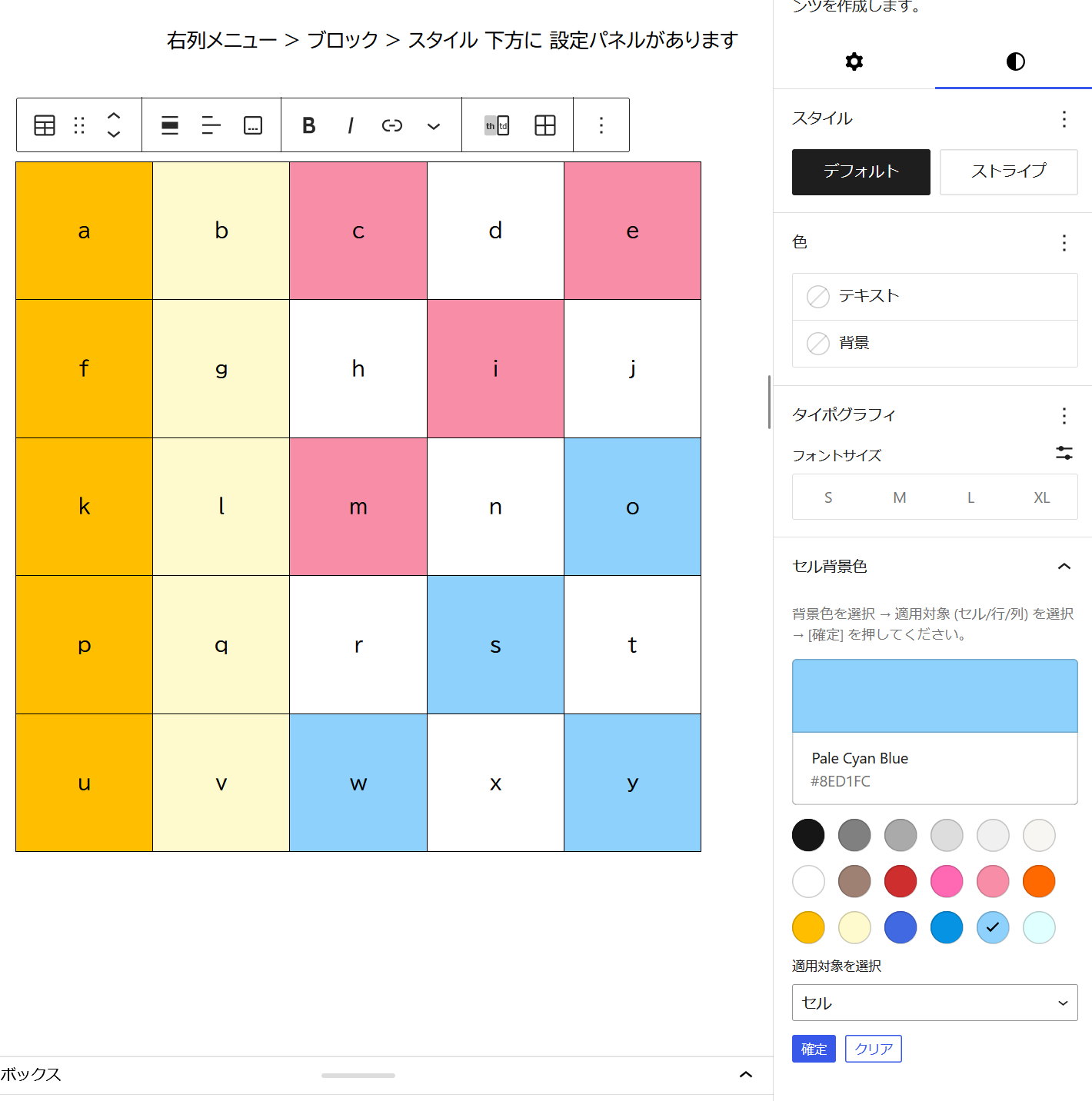
Cell Background Color
You can set background colors for individual cells, rows, or columns.
セルの結合
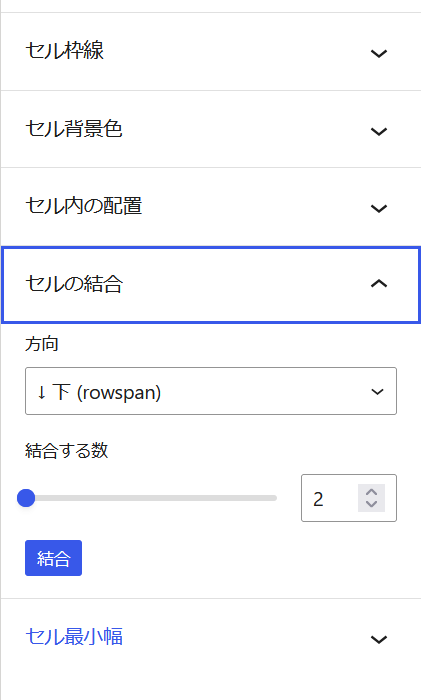
テーブル内の任意のセルにカーソルを置き、
右列メニュー > ブロック > スタイルタブ > [セルの結合] より
- 結合する方向を選択
右方向 … 列の結合 (colspan)
下方向 … 行の結合 (rowspan) - 結合する数を指定 (スライダーで選択)
- [結合] ボタンを押す
※ テーブル内に結合されたセルが存在する場合、[分割] ボタンが現れます。
Cell Merge
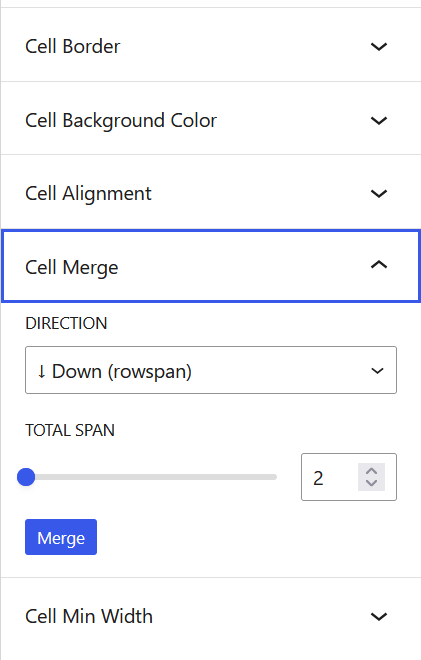
Place the cursor in any cell within the table,
Right-column menu > Block > Style tab > [Cell Merge]
- Select the direction of merging:
Right (colspan) : Merge columns
Down (rowspan) : Merge rows - Specify the number of cells to merge (select using the slider)
- Click the [Merge] button
*If merged cells already exist in the table, the [Split] button will appear.
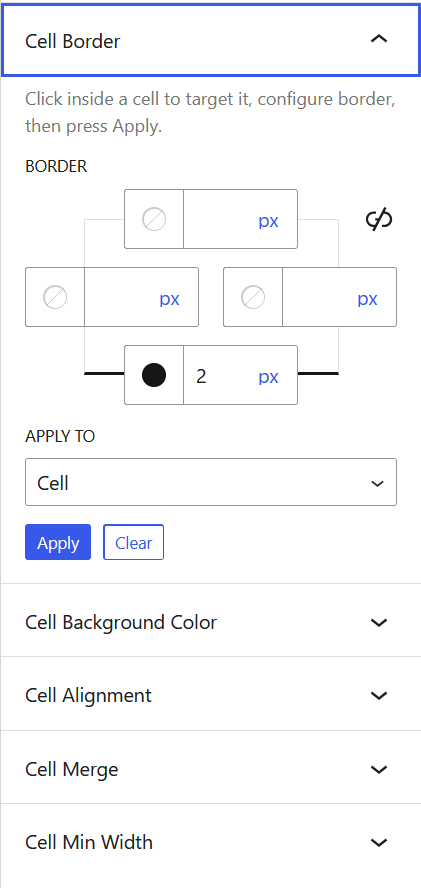
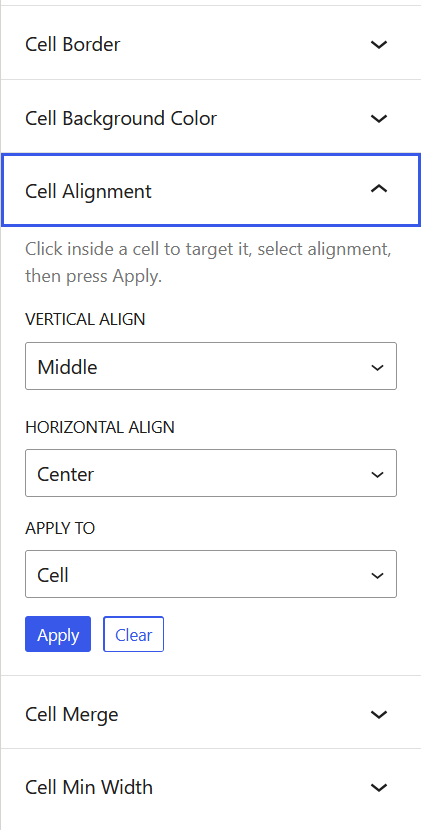
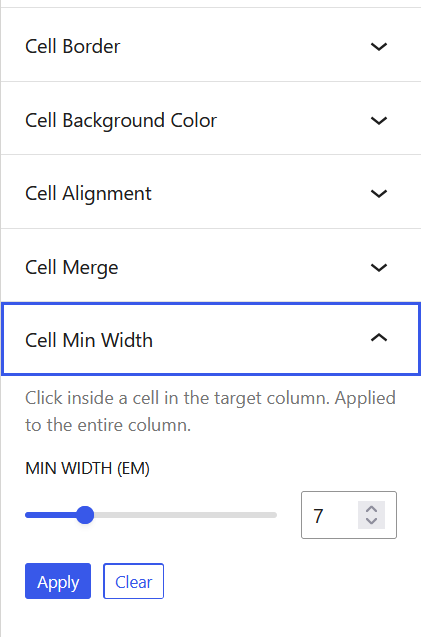
セル枠線、セル内の上下位置、セル最小幅
右列メニュー > ブロック > スタイルタブ にて
[セル枠線] [セル内の上下位置] [セル最小幅] を設定できます。
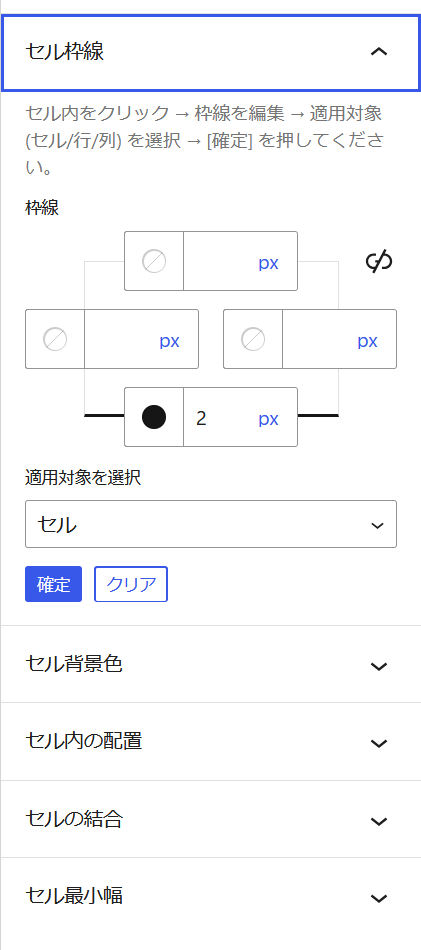
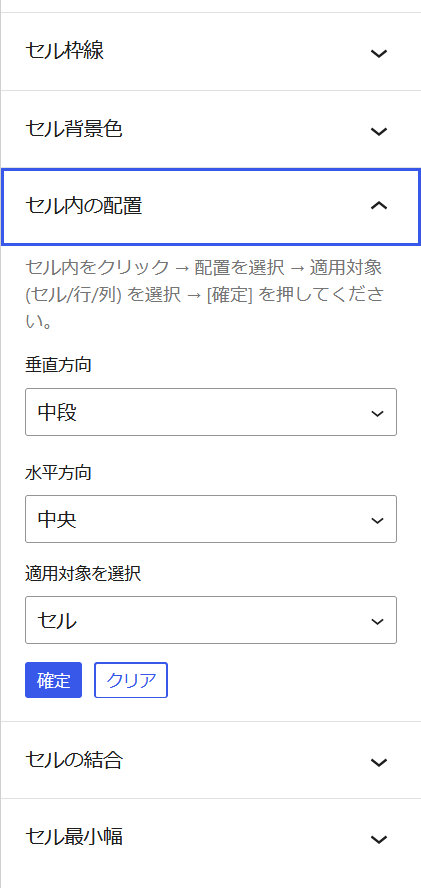
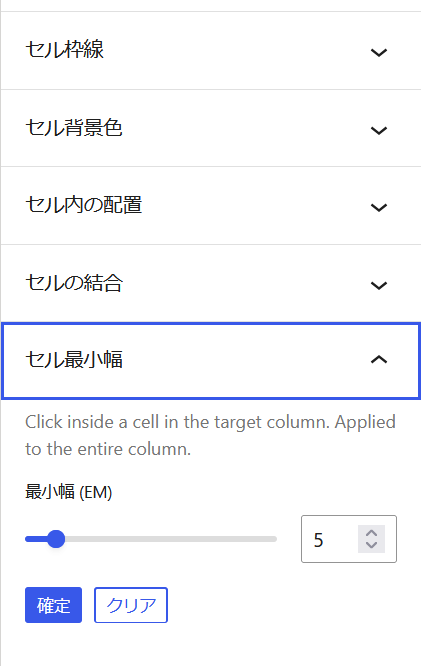
Cell Border, Vertical Align, Minimum Width
Right-column menu > Block > Style tab
You can configure [Cell Border], [Cell Vertical Align], and [Cell Min Width].
インライン書式の拡張
| 見出しのようにテキストを大きく おはよう こんにちは またね セル内に [ 区切り線 ] を挿入可能に なお、区切り線は Backspace で削除できます。マイケル フレディ ジャニス | テーブルセル内では、通常このくらいの行間(一続きの段落と同等の扱いで)でテキストが配置されます。 Enter を押しても、標準テーブルセル内では「改段落」という概念が適用されません。 そこで … 範囲をドラッグで指定して [ 行間を空ける (上) (下) ] ボタンを押すと、 このように、上部/下部に任意の(0.1行単位で)マージンをとる・調整することができます🙂 |
| 文字単位で テキストの大きさを変えられます。 | 文字色の変更は、ドラッグで範囲指定 ~ 標準機能の「ハイライト」からどうぞ |
WordPress標準テーブルブロックのセル内で使用できるインライン書式メニューが拡張され、自由度と使い勝手が向上します。
Extended Inline Formatting
| Enlarge text like a heading Hello World Bye[Divider lines] can now be inserted within cells. Note: Divider lines can be deleted with Backspace. Michael Freddie Janis | Within table cells, text is usually positioned with this much line spacing (treated the same as a continuous paragraph). Paragraph breaks are not applied within standard table cells. By dragging to select a range and pressing the [Add spacing (top) (bottom)] button, you can add/adjust margins to the top/bottom (in 0.1-line increments) as shown here. 🙂 |
| You can change the text size character by character. | To change the text color, select a range by dragging and use the standard “Highlight” function. |
This plugin extends the inline formatting menu available within the cells of standard table block, improving the usability of WordPress standard table block.
上記テーブルの管理画面スクリーンショットを付します。インライン書式の拡張がどのようになされるかをご覧ください。(クリックで拡大)
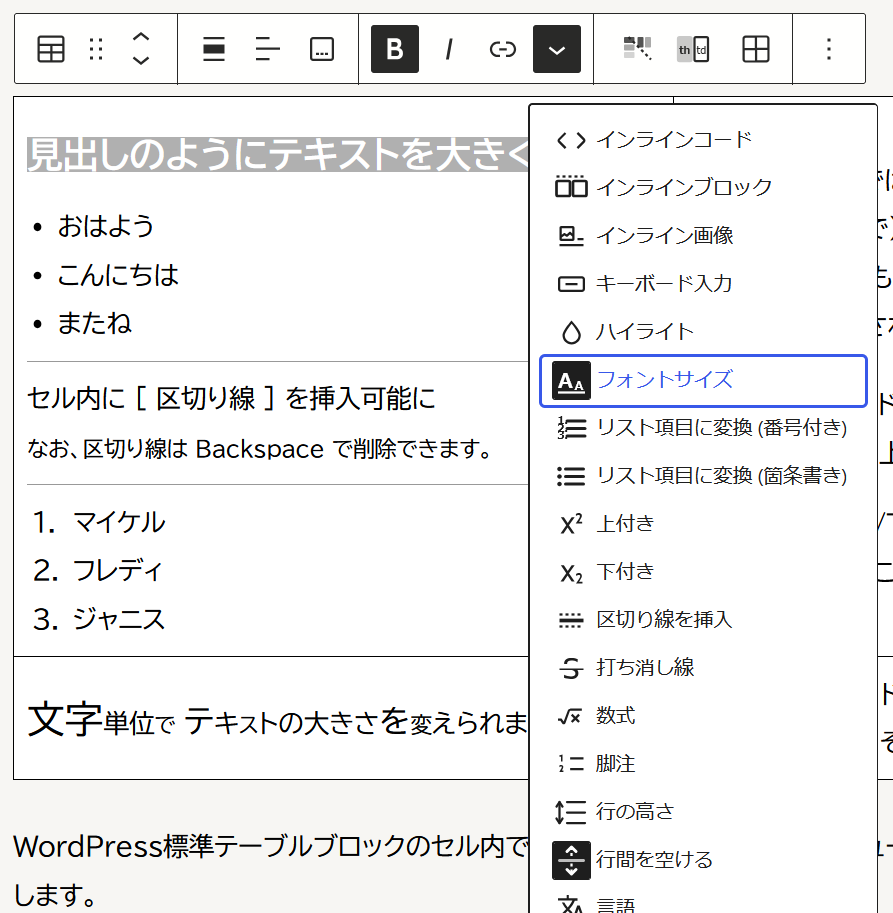
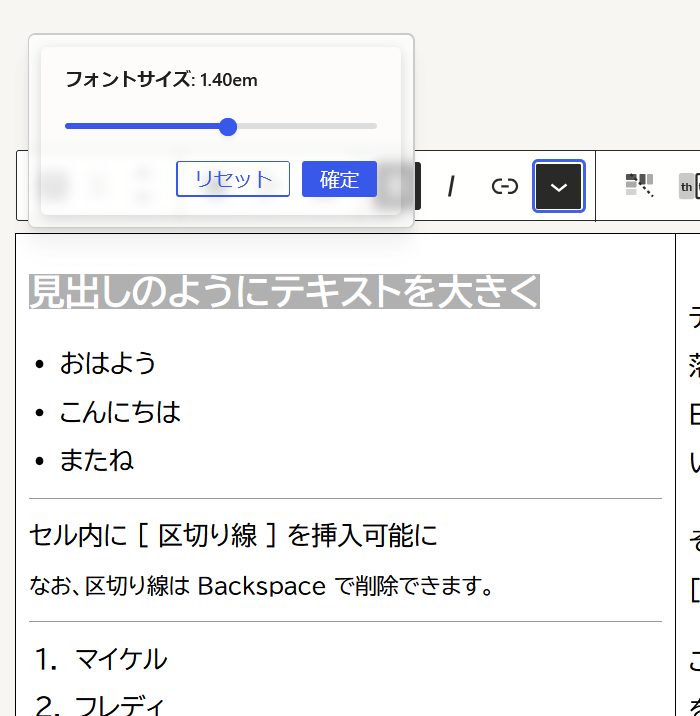
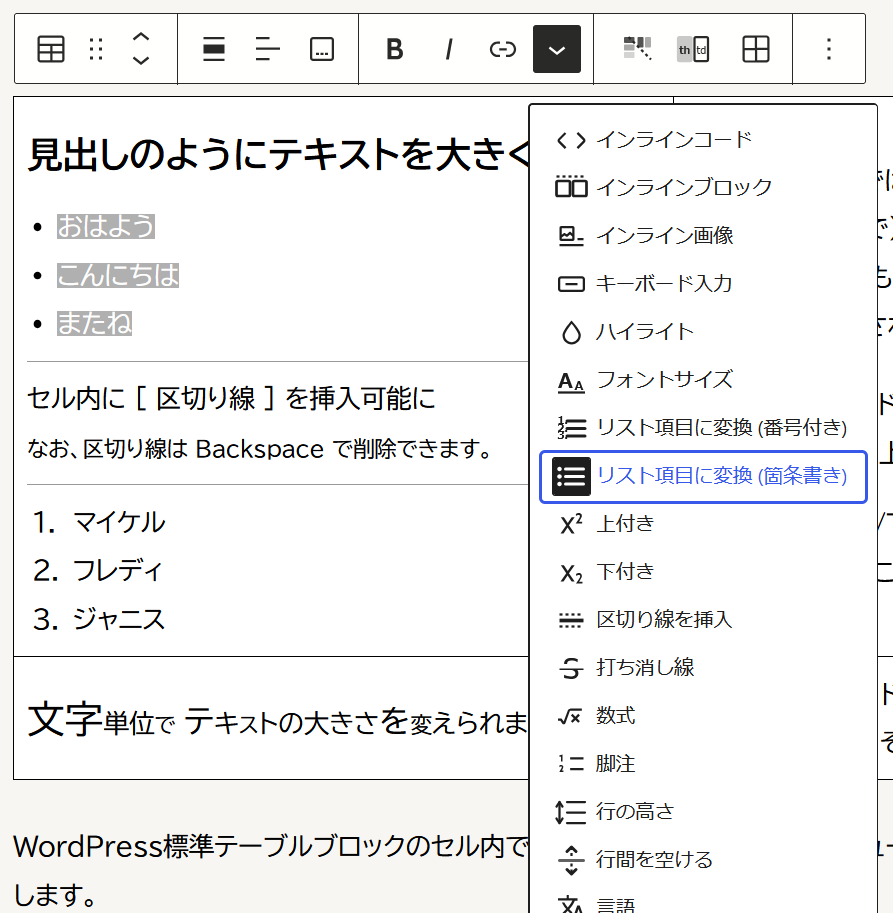
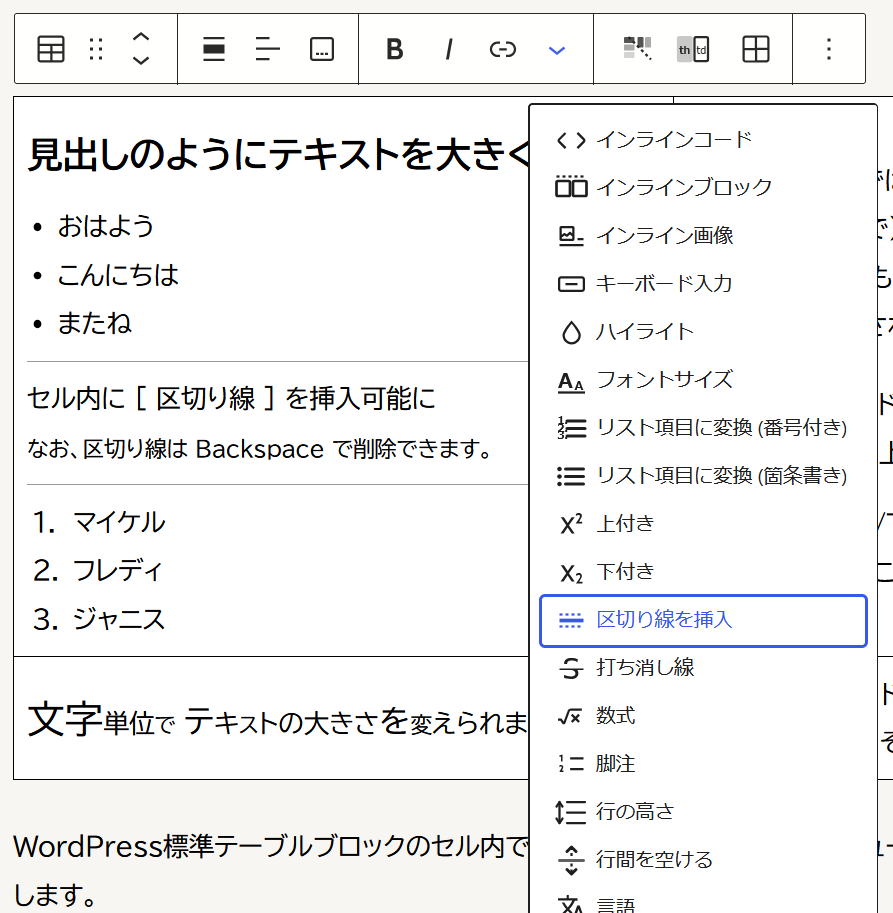
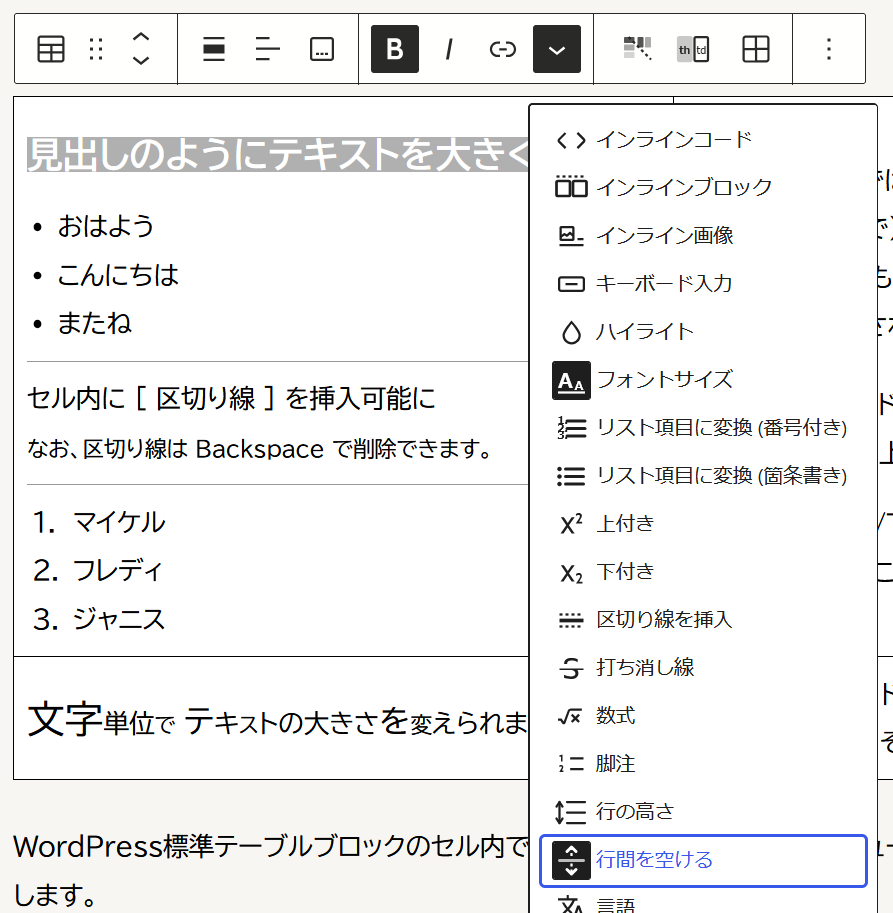
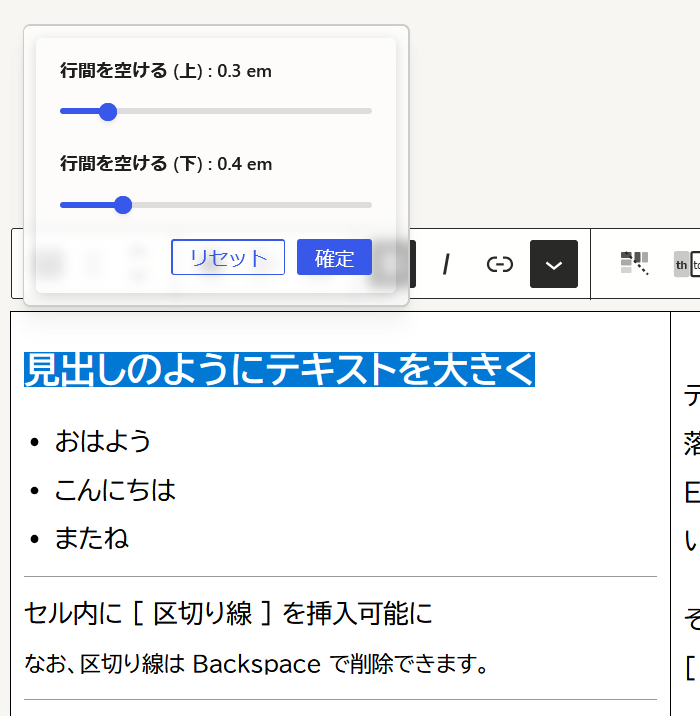
ドラッグで範囲選択 → インライン装飾メニュー展開 → 意図する書式を選択、という要領です。
Screenshots: The above table in admin editor. See how the inline formatting is extended. (Click to enlarge)
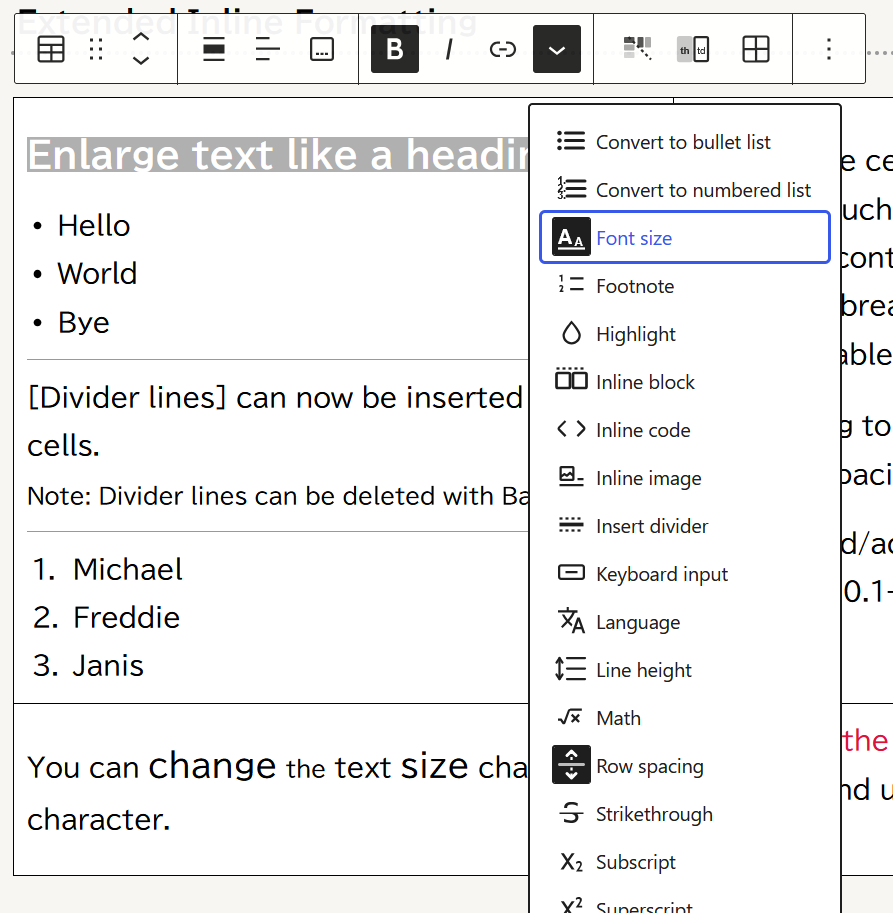
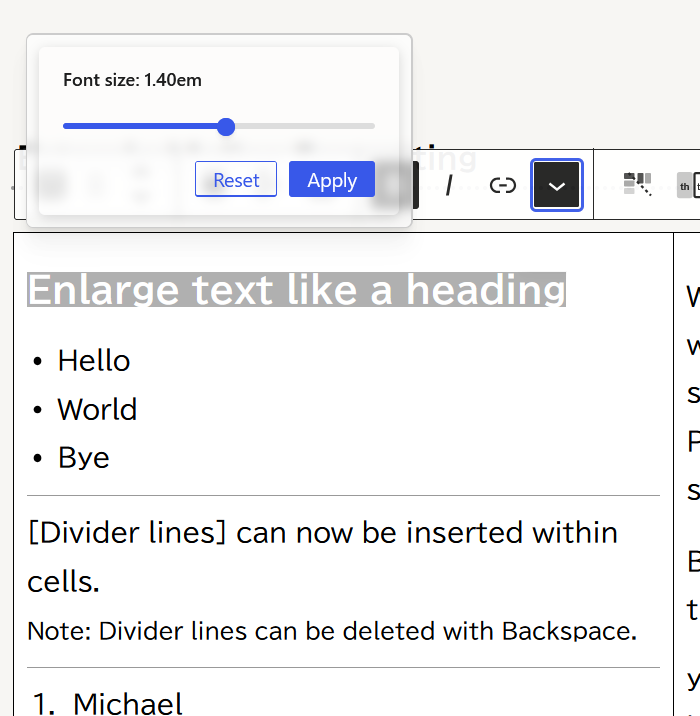
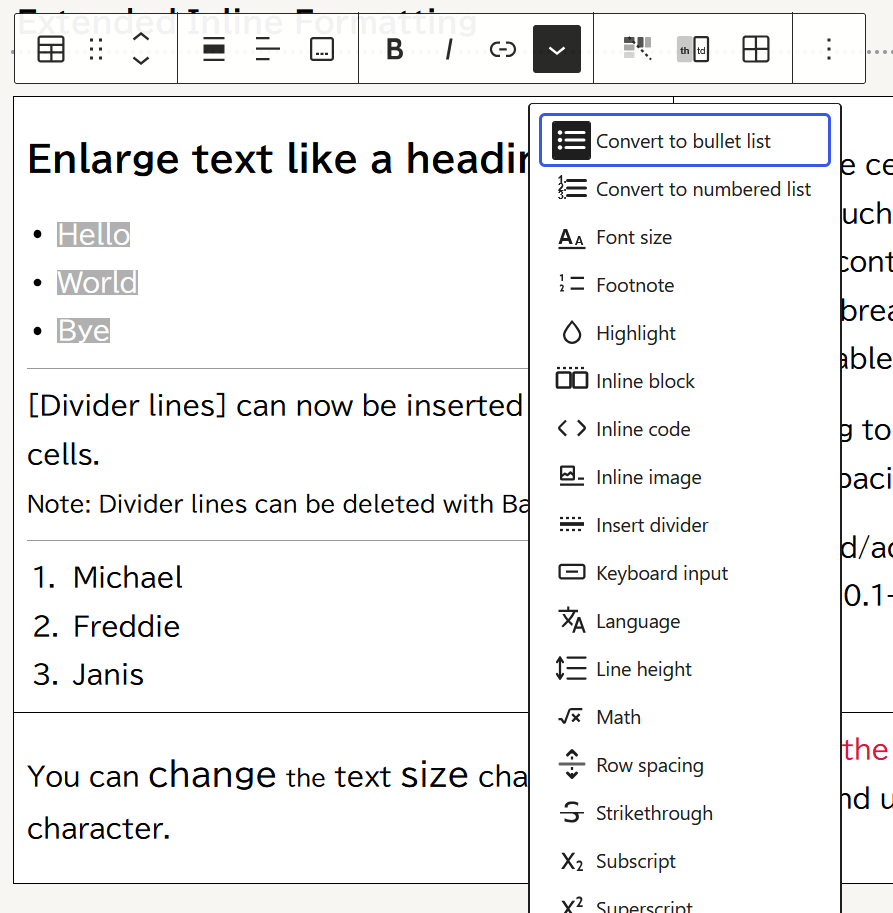
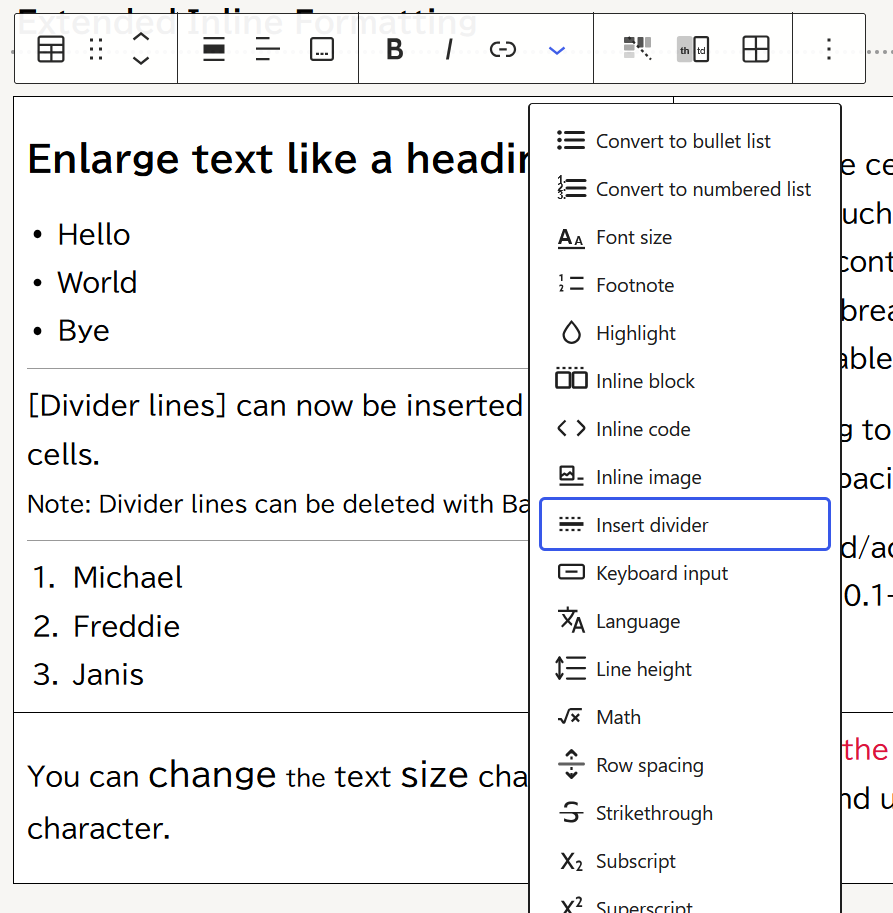
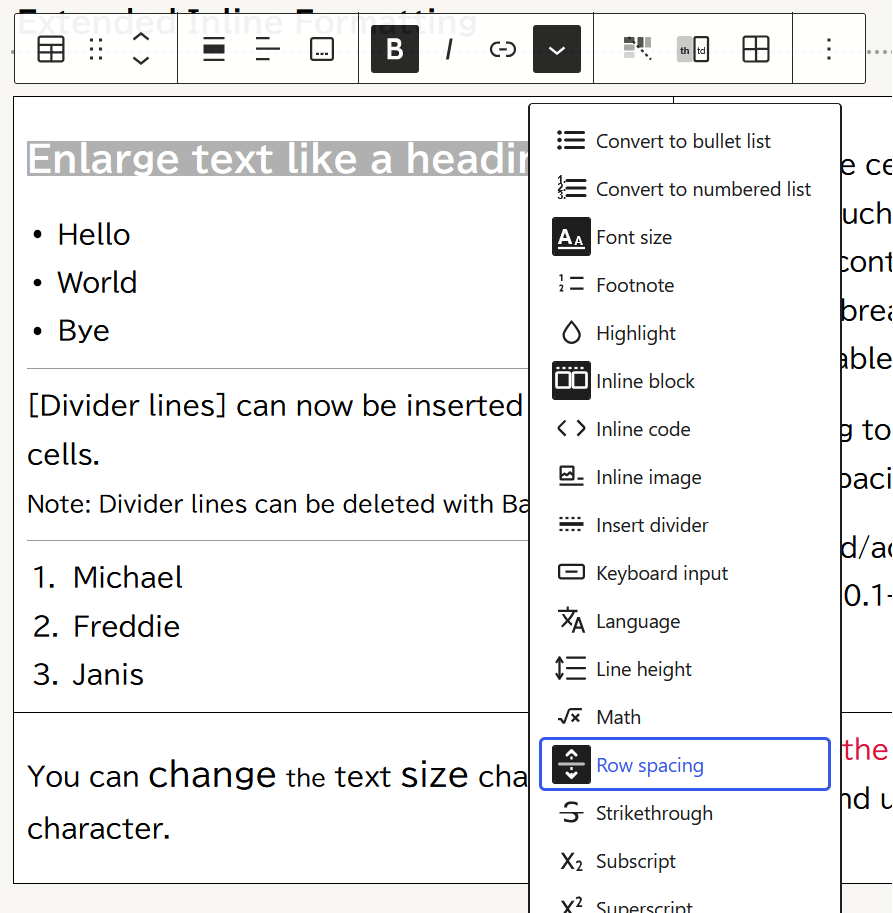
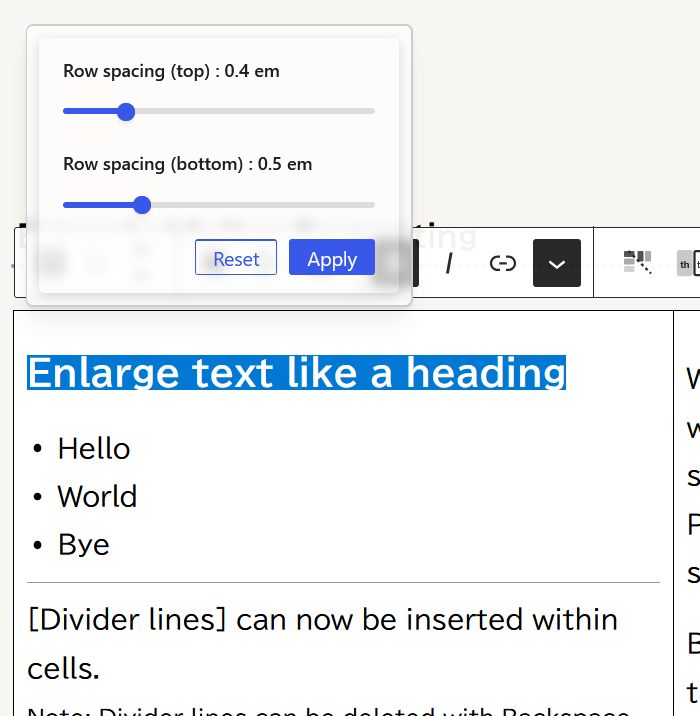
The process is: Drag to select a range → Expand the inline formatting menu → Select the desired formatting.
フォントサイズ変更 (0.75~2.0倍)
ドラッグしてテキストを選択した状態で、インライン書式のプルダウンから [フォントサイズ] ボタンを選択 → スライダーパネルで大きさを調整します。(0.75倍~2倍)
Variable font size (0.75x to 2x)
With the text selected by dragging, select the [Font Size] button from the inline formatting dropdown -> adjust the size using the slider panel. (0.75x to 2x)
疑似リスト変換(箇条書き・番号付き)
テキストを選択(複数行ドラッグ選択可)してボタンをクリックします。
各行が span 要素で囲まれ、CSS により箇条書き・番号付きリスト風に表示されます。
同じ選択範囲でボタンを再クリックすると解除してプレーンテキストに戻ります。
*注: Gutenberg の RichText は テーブルセル内の ul / ol / li 要素をサニタイズするため、span 要素+CSS による疑似的なリスト表現を採用しています。HTML ソース上では ul / ol / li は生成されません。
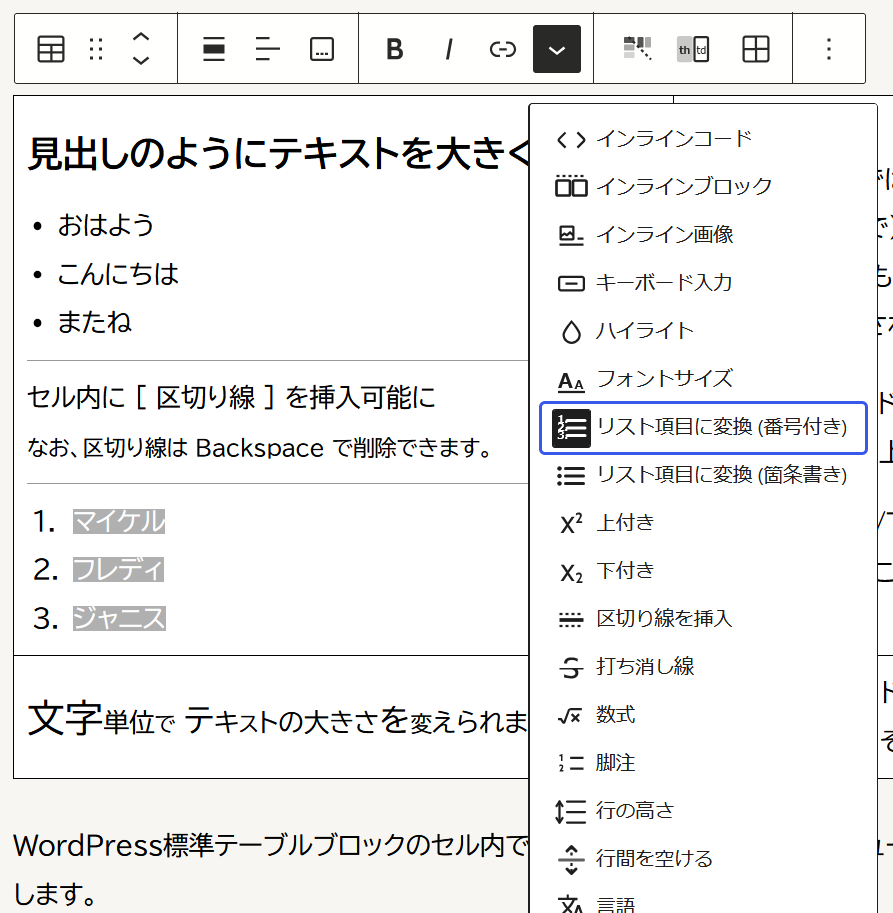
Pseudo-list conversion (bulleted and numbered lists)
Select the text (multiple lines can be selected by dragging) and click the button. Each line is enclosed in a `<span>` element and displayed as a bulleted or numbered list using CSS. Clicking the button again with the same selection will deselect it and return it to plain text.
*Note: Gutenberg’s RichText uses a pseudo-list representation with `<span>` elements and CSS to sanitize `<ul>`, `<ol>`, and `<li>` elements within table cells. `<ul>`, `<ol>`, and `<li>` elements are not generated in the HTML source.
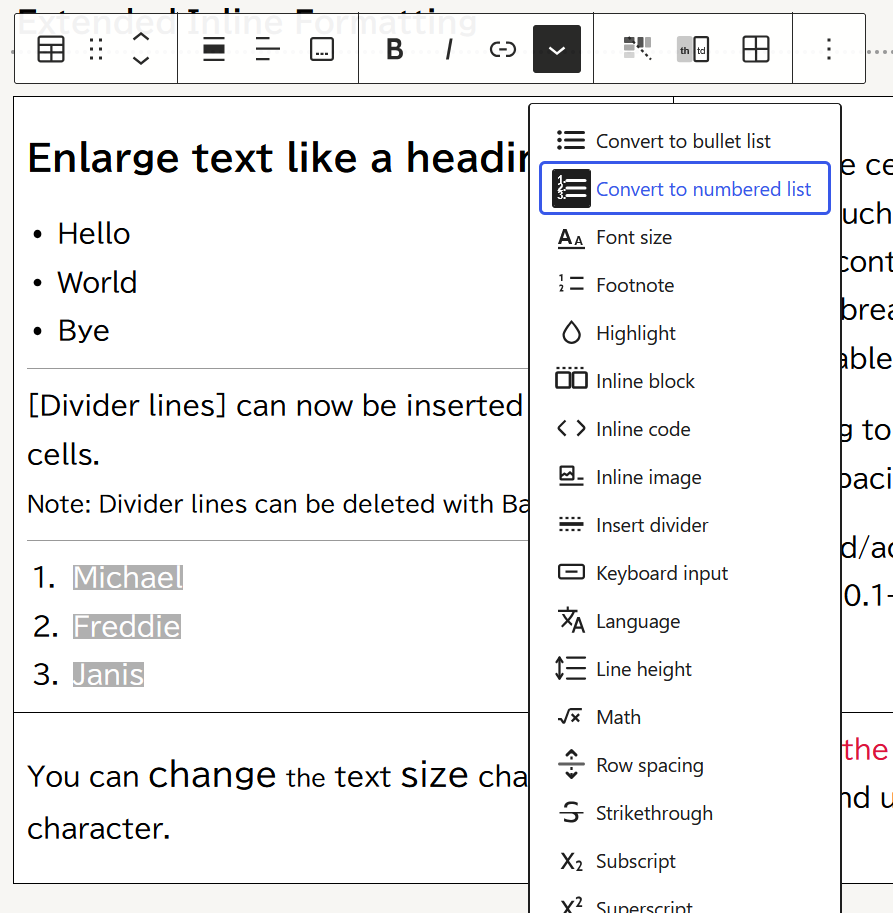
区切り線の挿入
ボタンをクリックすると、カーソル位置に区切り線を挿入します。Backspaceキーで削除できます。
*注: Gutenberg によるサニタイズ回避のため、 hr 要素ではなく span 要素 + CSS で疑似的な hr 水平線を表現します。
Inserting divider lines
Clicking the button inserts a divider at the cursor position. It can be deleted with the Backspace key.
*Note: To avoid sanitization by Gutenberg, a pseudo-`<hr>` horizontal line is represented using `<span>` elements and CSS instead of `<hr>` elements.
行間を空ける (0.1~2.0em)
テキストをドラッグで選択してボタンをクリックすると、指定したテキストの上部/下部にマージンをとれます。スライダーを動かして、0.1em単位で調整可能です。
行の高さ (0.75~2.0)
テキストをドラッグで選択してボタンをクリック ~ スライダーで line-height の調整が可能です。
Row Spacing (0.1 to 2.0 em)
Drag to select text and click the button to add margins to the top/bottom of the specified text. The slider allows adjustment in 0.1em increments.
Line Height (0.75~2.0)
Drag to select text and click the button to adjust the line-height using the slider.
おまけ
テーブルブロック外での拡張書式利用
オプション設定にて、上記インライン書式の拡張をテーブルブロック外でも有効にすることができます。
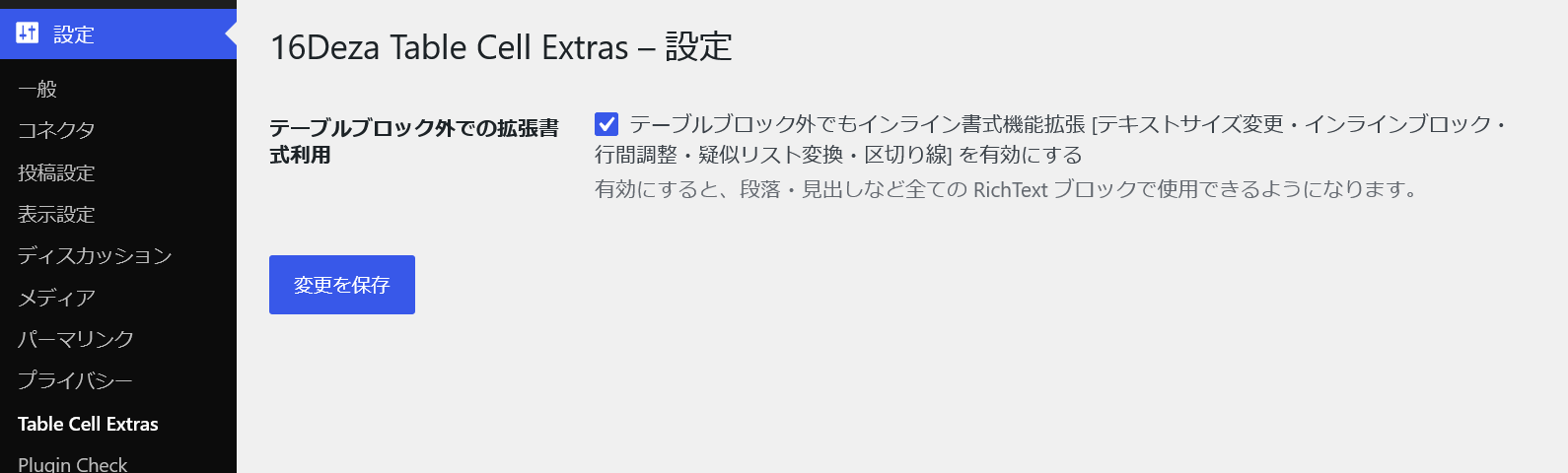
(左列メニュー 設定 > Table Cell Extras より、チェックボックスをONにするだけ)
有効にすると、見出しブロック、段落ブロック、リストブロックなどでも Table Cell Extras の拡張インライン書式が使えるようになります。
例えばこのように、標準のリストブロックを使って (HTMLを書かずに・エディター上でのGUI操作で) 入れ子状リストを作ることもできます。
※ リストブロック > リストアイテムの中で、インライン拡張書式の疑似リスト変換を使用
利用規約やプライバシーポリシーなどでも、入れ子リストを使いたいケースはよくありますよね。
ご活用いただければ幸いです。
(リストブロック内での利用例)
- スティーヴィー
Overjoyed
Isn’t She Lovely
To Feel The Fire - ジャニス
Cry Baby
Piece Of My Heart
Me and Bobby McGee - フレディ
Bohemian Rhapsody
Don’t Stop Me Now
Somebody To Love - マイケル
Man In The Mirror
Billy Jean
Smooth Criminal
Option
Extended Formatting Outside Table Blocks
Additionally, extended inline formatting can optionally be enabled outside of table blocks.
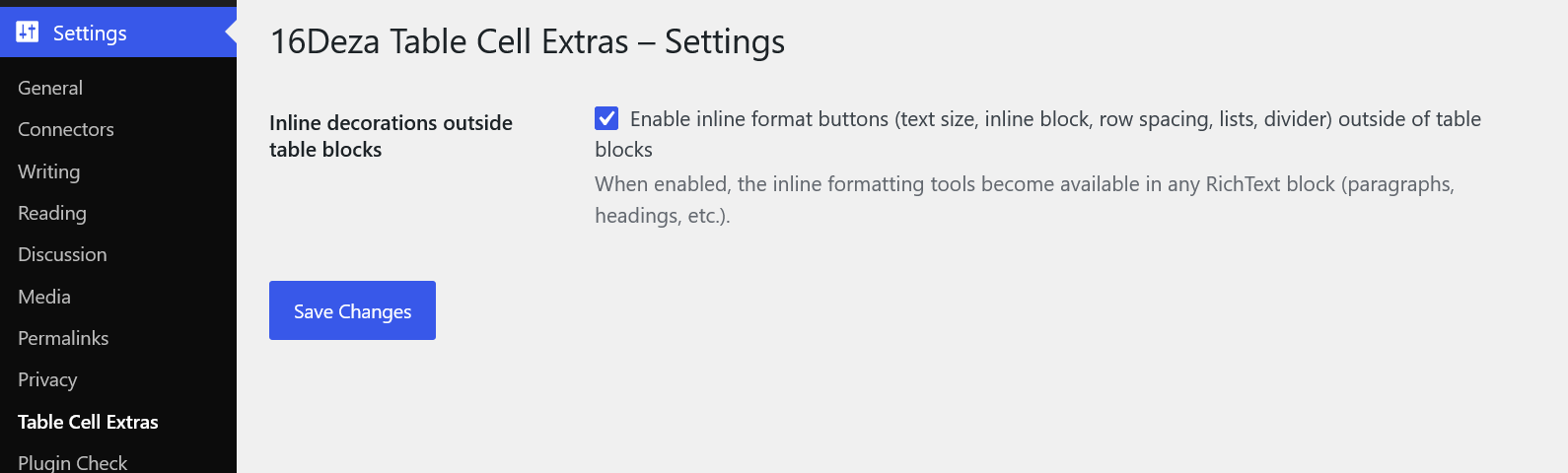
(Simply check the checkbox in: Settings > Table Cell Extras)
When enabled, the extended inline formatting of Table Cell Extras can be used in heading blocks, paragraph blocks, list blocks, etc.
For example, you can create nested lists using a standard list block (without writing HTML, using GUI operations in the editor).
* Use the pseudo-list conversion of inline extended formatting within the list block > list item
There are many cases where you want to use nested lists, such as in terms of service or privacy policies.
I hope you find this useful.
(Example of use within a list block)
- Stevie
Overjoyed
Isn’t She Lovely
To Feel The Fire - Janis
Cry Baby
Piece Of My Heart
Me and Bobby McGee - Freddie
Bohemian Rhapsody
Don’t Stop Me Now
Somebody To Love - Michael
Man In The Mirror
Billy Jean
Smooth Criminal
Download
動作要件
- WordPress 6.4 以上
- PHP 8.2 以上を推奨(最低 7.4 以上)
- Gutenberg ブロックエディター使用時
Requirements
- WordPress 6.4 or higher
- Reccomended: PHP 8.2 or higher (at least 7.4)
- Gutenberg Block Editor
インストール
- WordPress 管理画面 > プラグイン > プラグインを追加 > プラグインのアップロード >
- [参照] ボタンを押す > (PC内の) table-cell-extras-v1.x.x.zip を選択してアップロード
- 「16Deza Table Cell Extras」を有効化
Installation
- WordPress admin > Plugins > Add Plugin > Upload Plugin >
- [Browse] Button > Select (in your PC) table-cell-extras-v1.x.x.zip and Upload
- Activate “16Deza Table Cell Extras”
免責事項
- ご利用は自己責任でどうぞ。 * フリーウェア自己責任の原則 / GPLライセンス 自己責任
- 利用に伴ういかなる問題・損害についても、何ら補償はいたしかねます。
Disclaimer
- Use at your own risk. * Principles of Freeware and Self-Responsibility / GPL license
- I cannot provide any compensation for any problems or damages arising from use.
- Sorry, I am usually unable to reply to inquiries regarding usage. (only provide services to customers who directly request website creation and maintenance)
備考
- 当プラグインの開発には、AI(Claude)の手を大いに借りております。多謝🙇♂️
- ライセンスは GPL-2.0-or-later です。(プラグイン本体に明記)
- 著作権は当方:ジュウロクデザインに帰属します。(プラグイン本体に明記)
Notes
- This plugin was developed with the help of AI (Claude). Many thanks!🙇♂️
- License: GPL-2.0-or-later (As stated in the plugin)
- Copyright belongs to JuuRokuDesign. (As stated in the plugin)
サポート・問い合わせ
WordPress構築、トラブル相談、既存サイトの改修などに関する問い合わせ全般は大歓迎です🙂 こちらのメールフォーム からご相談いただければ幸いです。
使用方法などをお問い合わせいただいても返信できない場合がほとんどとなります。悪しからずご了承ください。 (例外:直接サイト制作・メンテナンスをご依頼のお客様にはもちろん対応させていただきます)
 こちらのメールフォームで