
 日本語
日本語 English
16Deza Block Curator
Gutenberg ブロックエディターで使用するブロックの種類を、管理者が「選択的に制限する」ことのできるプラグインです。(WordPress公式プラグイン)
クライアントのサイト運営上、こんなの欲しかったんだよなぁというものを作ってみました。もしよろしければダウンロードしてご利用ください。
Latest Version: 0.2.1 ( 2026-09-19 )
* WooCommerceに対応しました

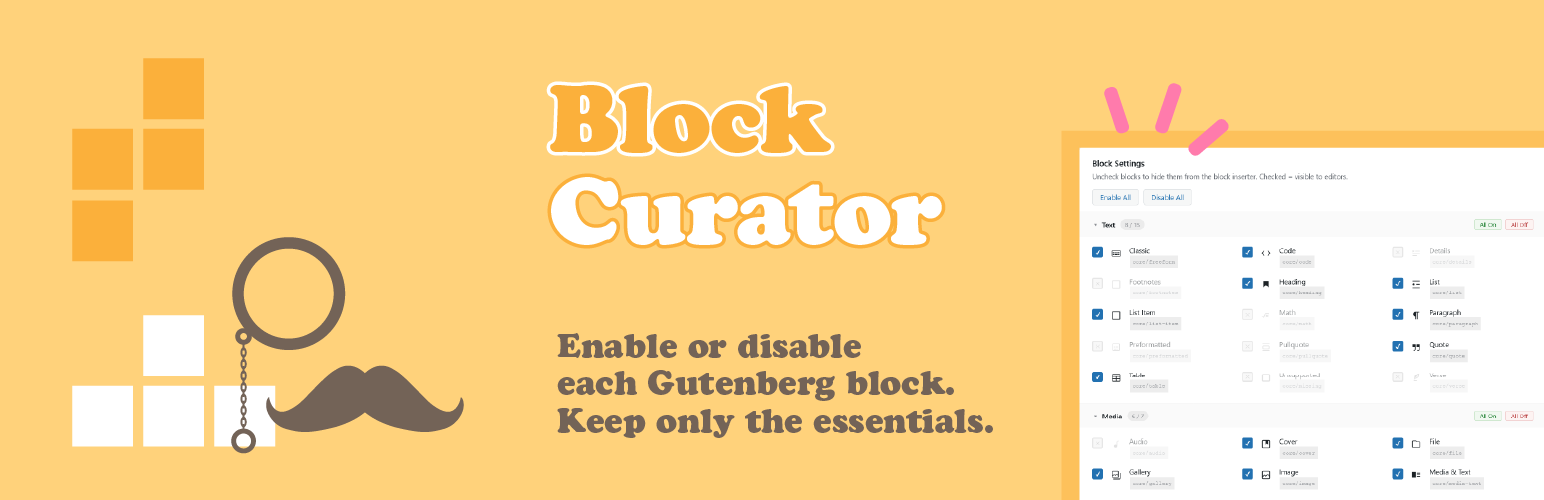
This plugin allows administrators to selectively restrict the types of blocks used in Gutenberg / the block editor. (WordPress official plugin)
I created this because I thought it would be useful for managing a client’s website. Please feel free to download and use it if you’re interested.
Latest Version: 0.2.1 ( Sep 19, 2026 )
* Added: WooCommerce support
Why?
WordPress標準のブロックエディターはとても多機能で素晴らしいものですが … 若干 too much 感も。
挿入できるブロックの種類が多すぎて(特に、WordPressに不慣れなユーザーにとっては)「これ何?」と戸惑いの元にもなりかねません。選択肢が多いほど、必要なものを探すのに見つけにくくなるというジレンマ。
日常のサイト更新で頻繁に使用するブロックは限られており、中小ビジネスサイトのお知らせやブログなどでは全く使用しないブロックも大量にあります。
よく「日本製の家電、TVやDVDプレイヤーのリモコンはボタンが多すぎて使いにくい」と言われます。ボタンは少ない方が迷わず直感的に使えます … よね。
The standard WordPress block editor is very feature-rich and wonderful, but … it can feel a bit too much.
The sheer number of block types that can be inserted (especially for users unfamiliar with WordPress) can be confusing, leading to questions like, “What’s this?” The more options there are, the harder it becomes to find what you need — a dilemma.
In daily website updates, the blocks used frequently are limited, and there are many blocks that are never used at all in announcements or blogs on small and medium-sized business websites.
It’s often said that “Japanese-made appliances, like TV and DVD player remotes, have too many buttons and are difficult to use.” Fewer buttons make them easier to use intuitively … right?
So,
そこで🙂 当プラグインは
管理者ユーザーが「ブロックエディター内で使うブロックを選択的に制限」する設定を行うことで、スッキリとした・そのサイトの実情に合った、使いやすいUI/UXを整える機能を提供します。
いわゆる「引き算思考」「引き算の美学」で
あらかじめ、使うブロックの選択肢をグッと少なく絞り込んでおけば、ブロックの全リストを表示させた時も「ユーザーが普段使うものだけ」がリストされ、選びやすくなり効率が上がります。
例えて言うなら、航空機のコクピットのように計器・ボタンだらけのようなコンソールを使いこなせる人は限られますが、自家用車のようなコンソールであれば、万人が直感的に理解して使える … みたいな感じです。
Therefore 🙂 this plugin
provides a function that allows administrators to selectively restrict the blocks used within the block editor, resulting in a clean, user-friendly UI/UX that suits the specific site.
It’s a kind of “subtractive thinking” or “aesthetics of subtraction.”
By significantly narrowing down the block options beforehand, when the full list of blocks is displayed, only the ones the user normally uses will be listed, making selection easier and increasing efficiency.
To use an analogy, while only a limited number of people can master a console full of instruments and buttons like an aircraft cockpit, a console like that of a personal car is intuitively understandable and usable by everyone … something like that.
機能・使い方
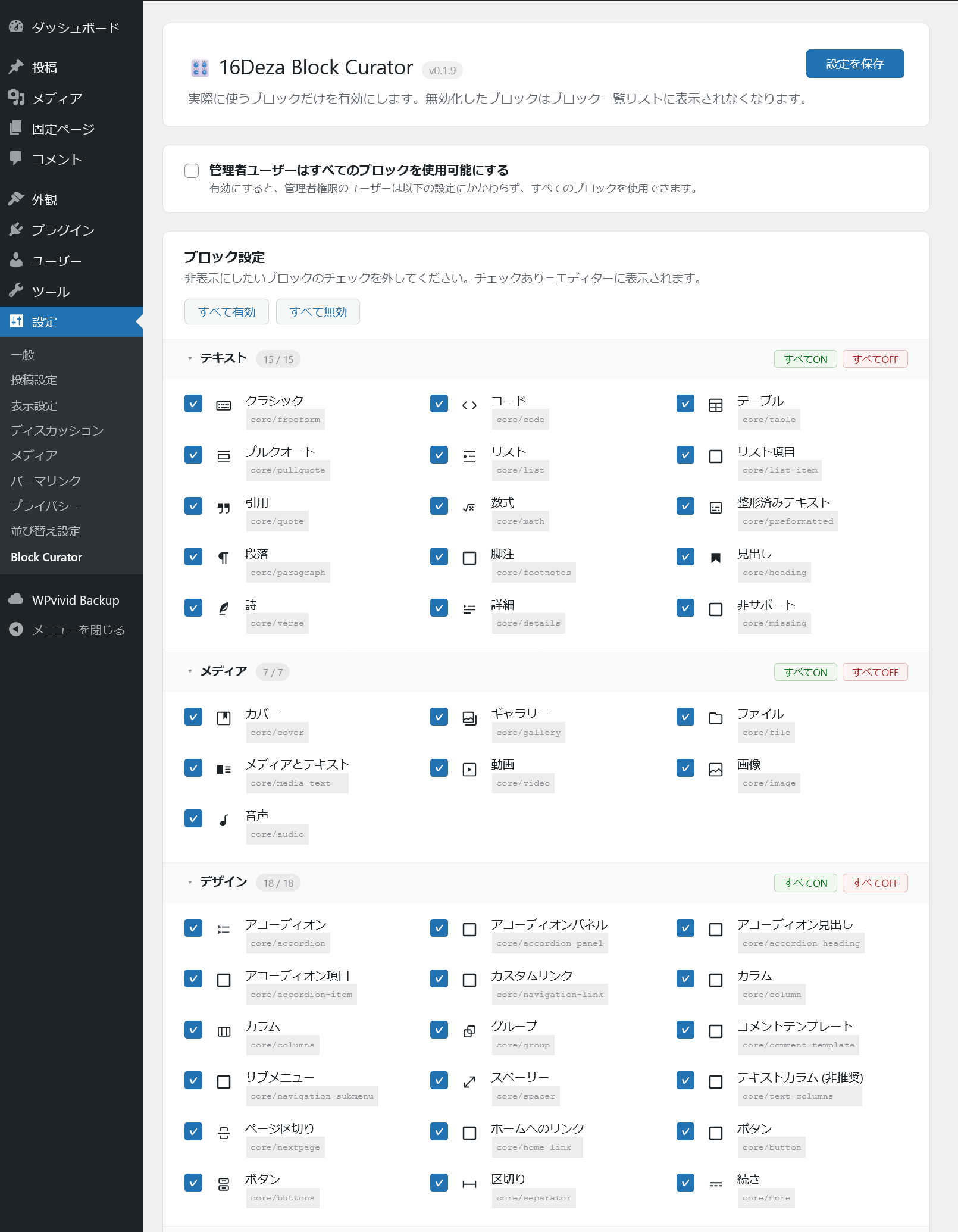
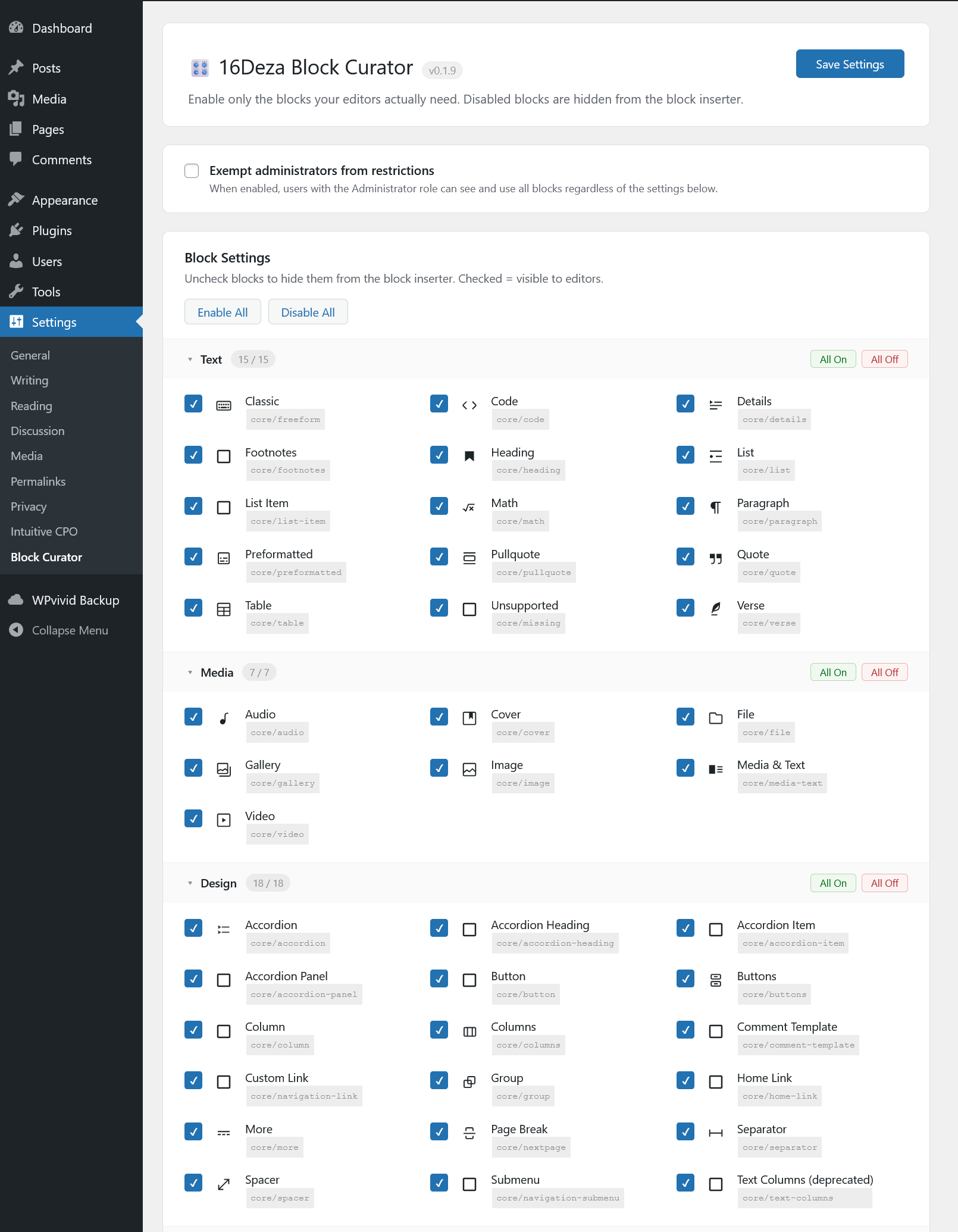
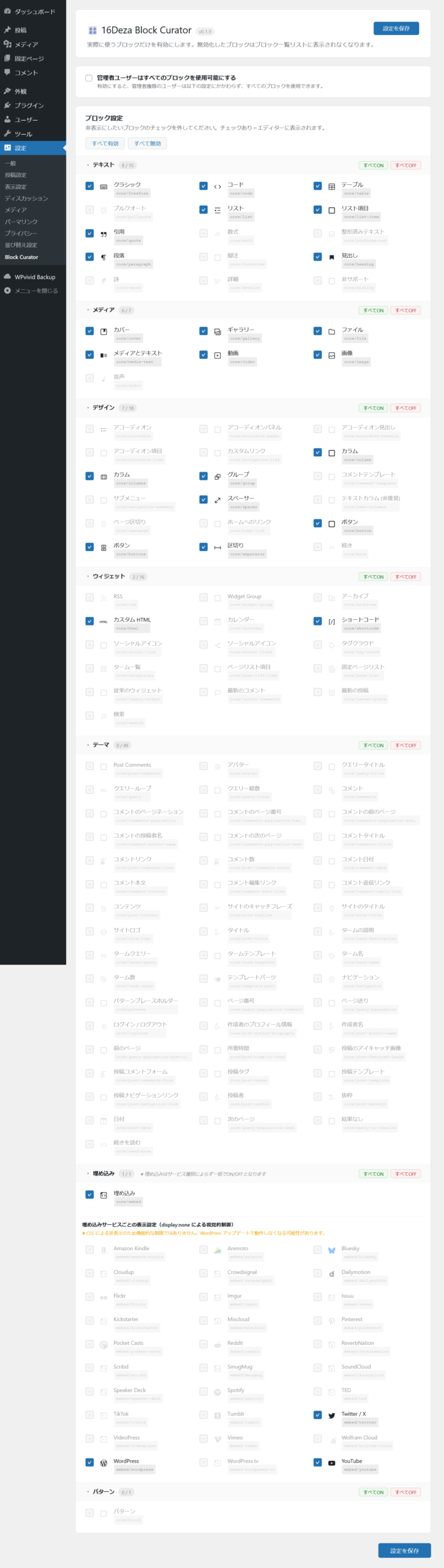
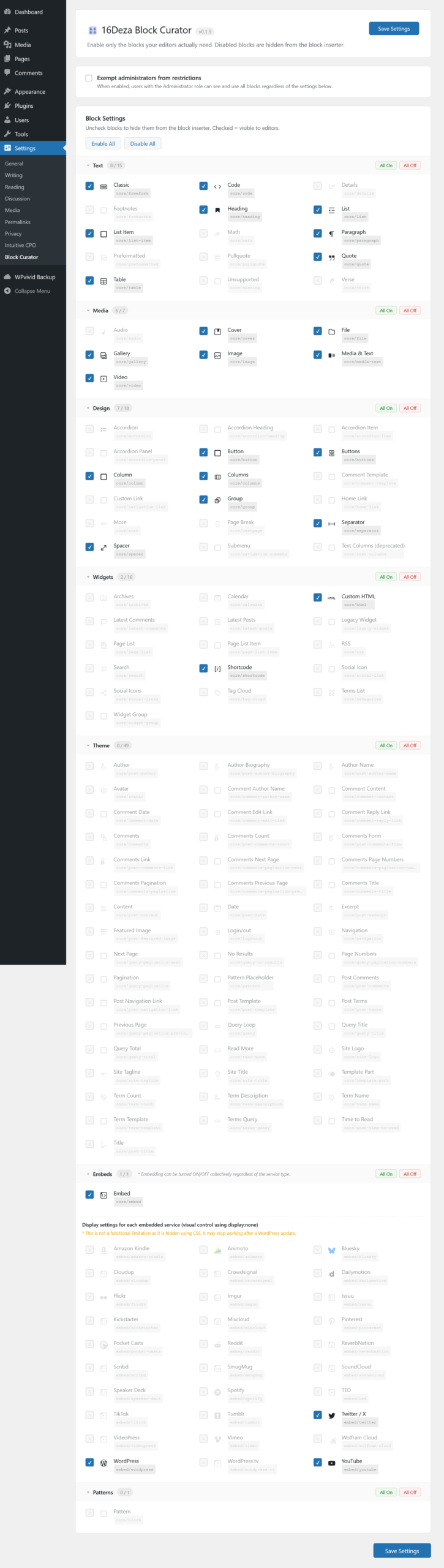
WordPress管理画面 > 設定 > Block Curator より 設定ができます。
Functions, Features
You can configure this in WordPress Admin Panel > Settings > Block Curator.
設定例
運用するサイトや、お客様サイドの担当者のWordPress習熟度・使用状況に合わせて設定(必要なもの・使うものだけ厳選 = Curate)するのが吉と思います。
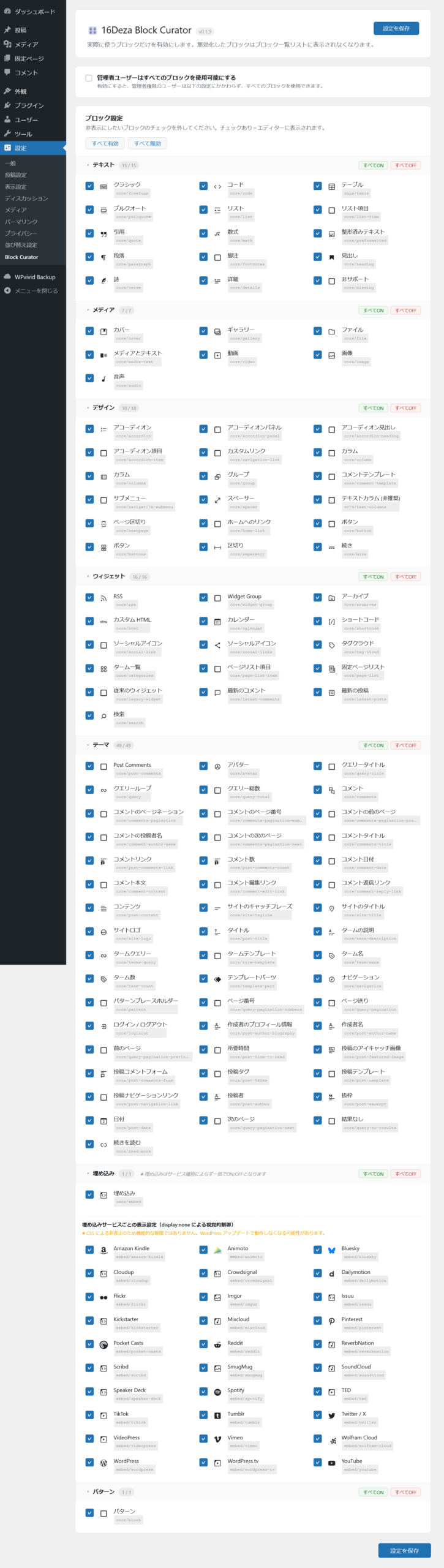
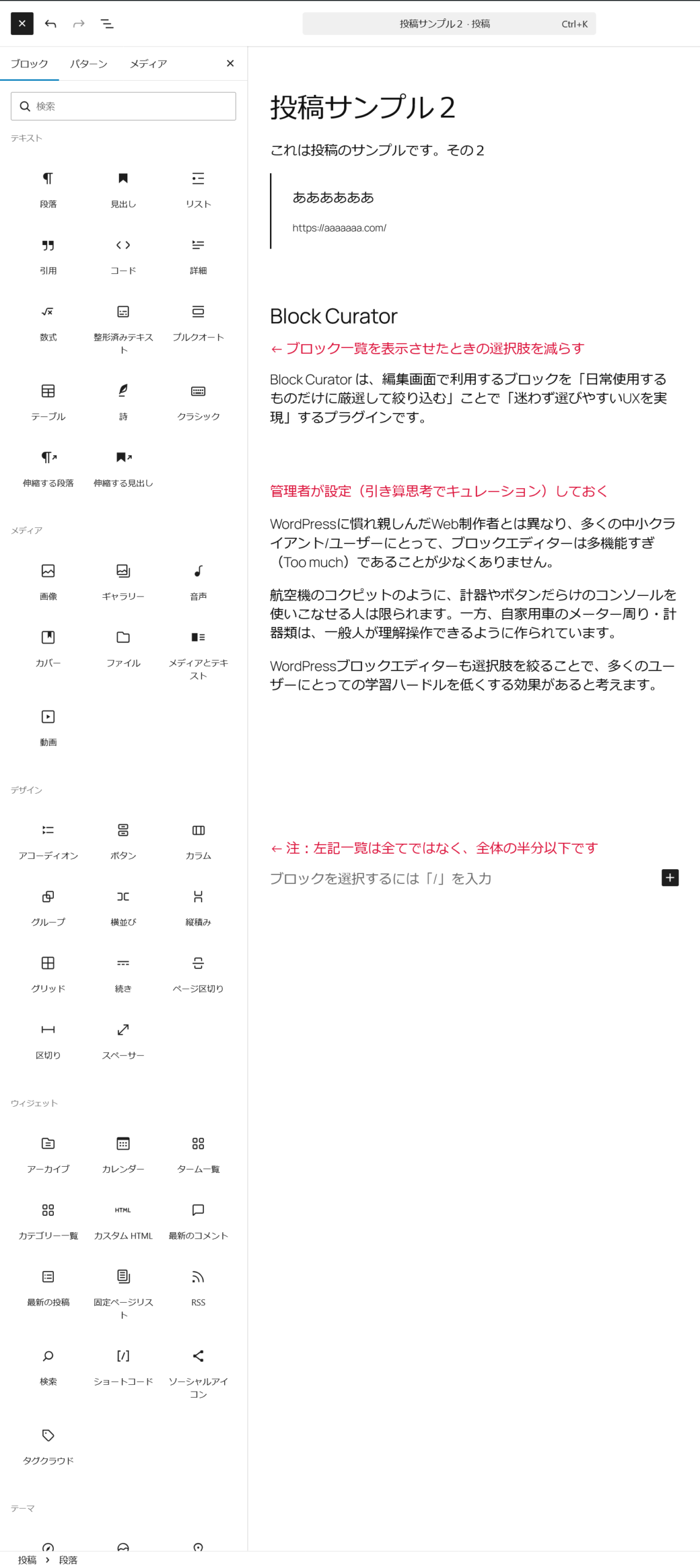
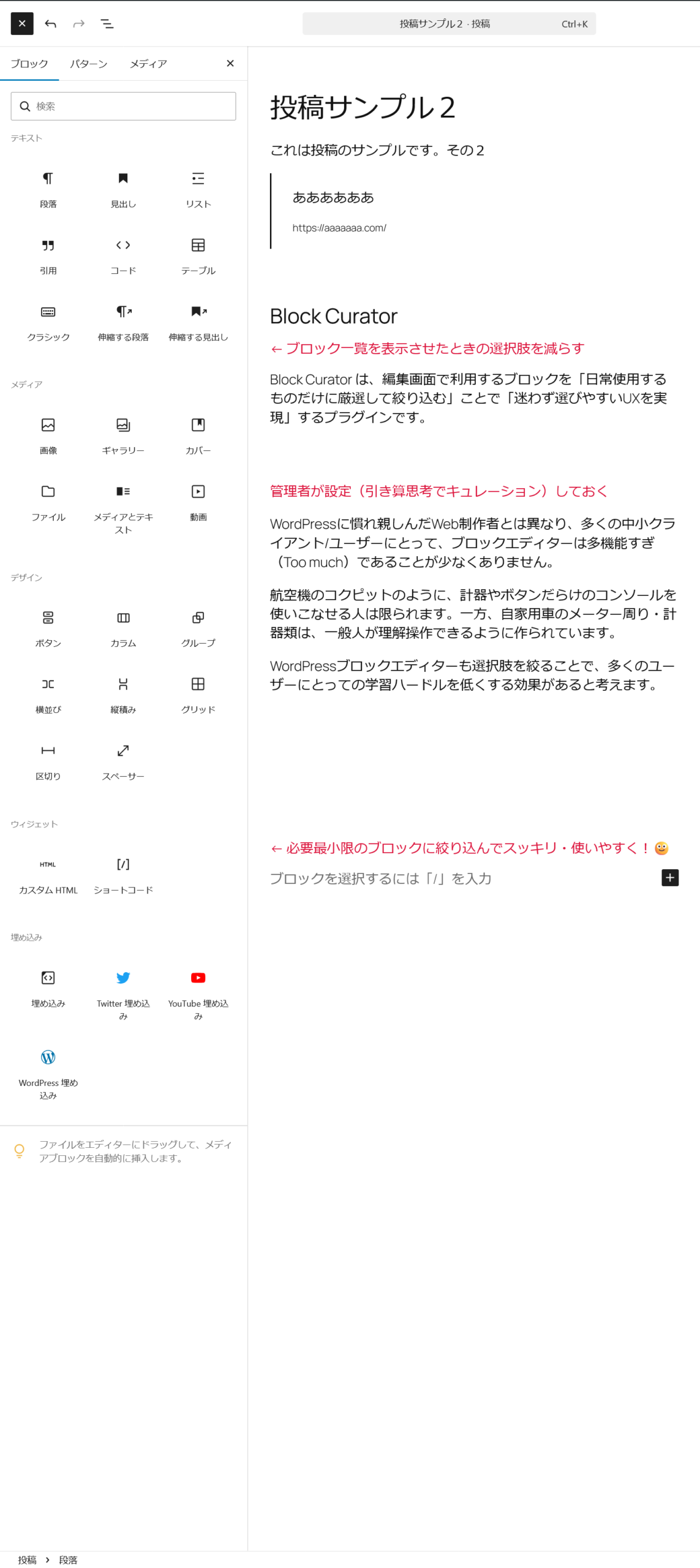
使うものだけにグッと絞り込むことで …
編集画面でブロック一覧を表示させた際もスッキリし、選びやすく・使いやすくなります🙂
Example settings
It’s best to configure it according to the site you’re managing and the WordPress proficiency and usage of the client’s staff. Selecting only what’s necessary and used … Curate!
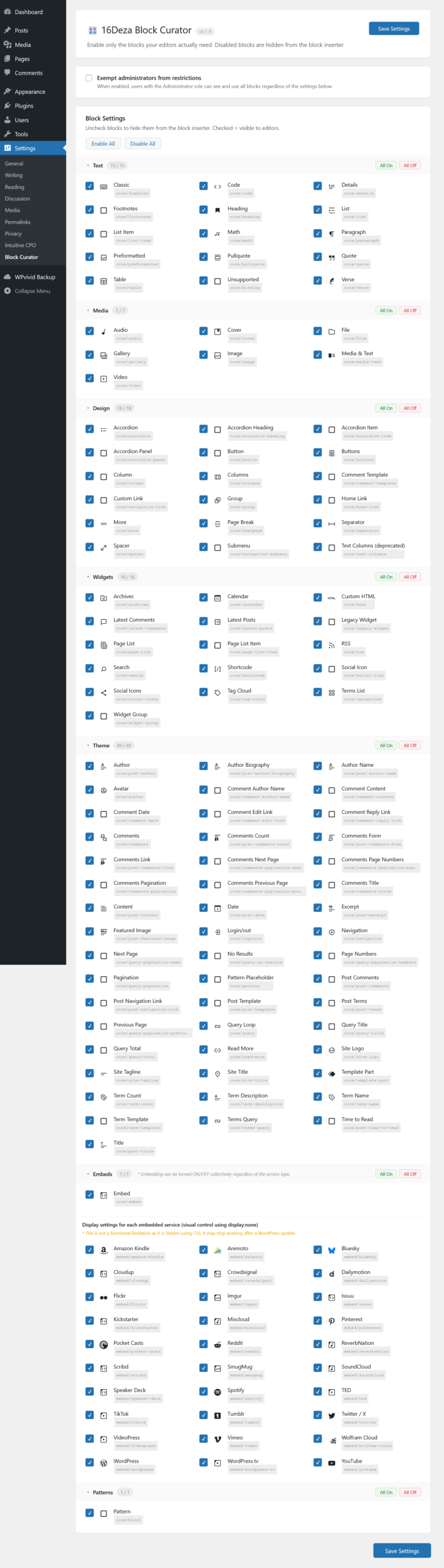
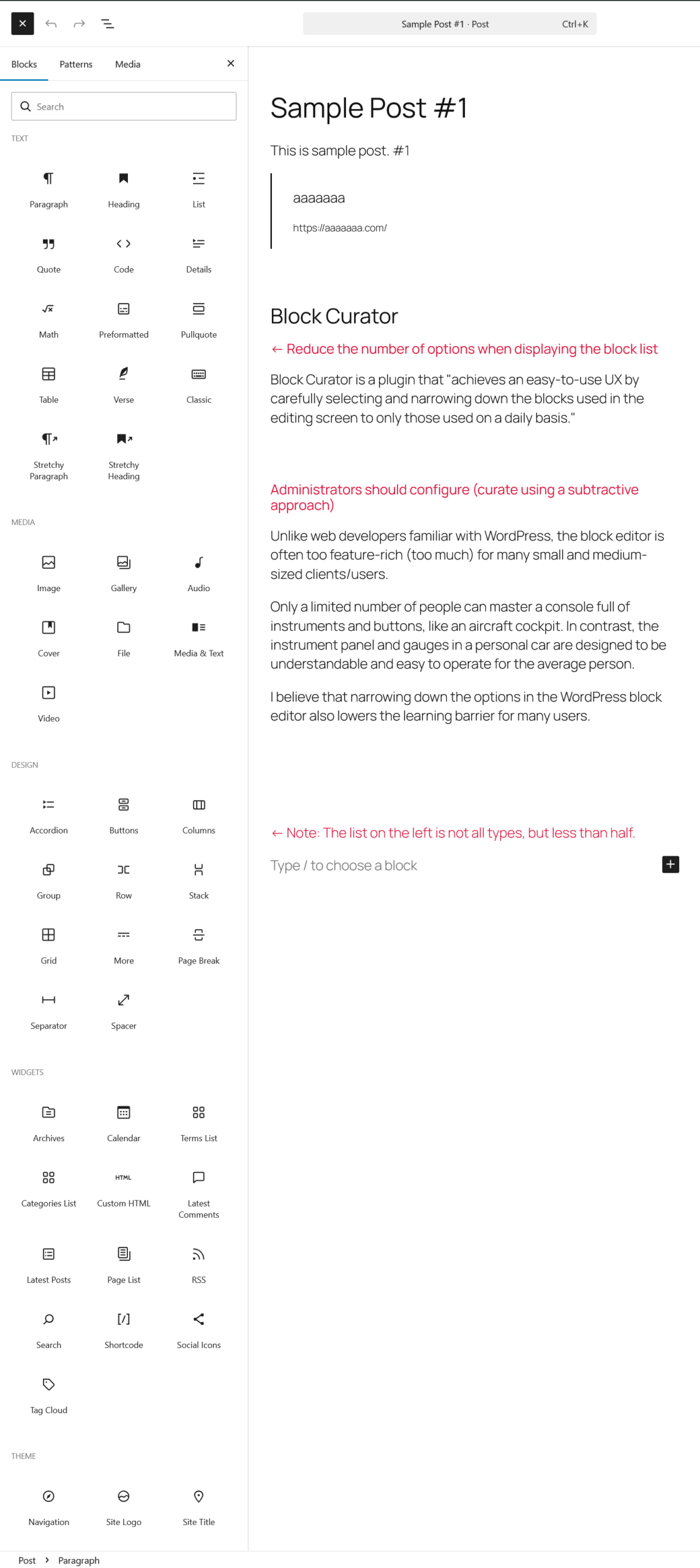
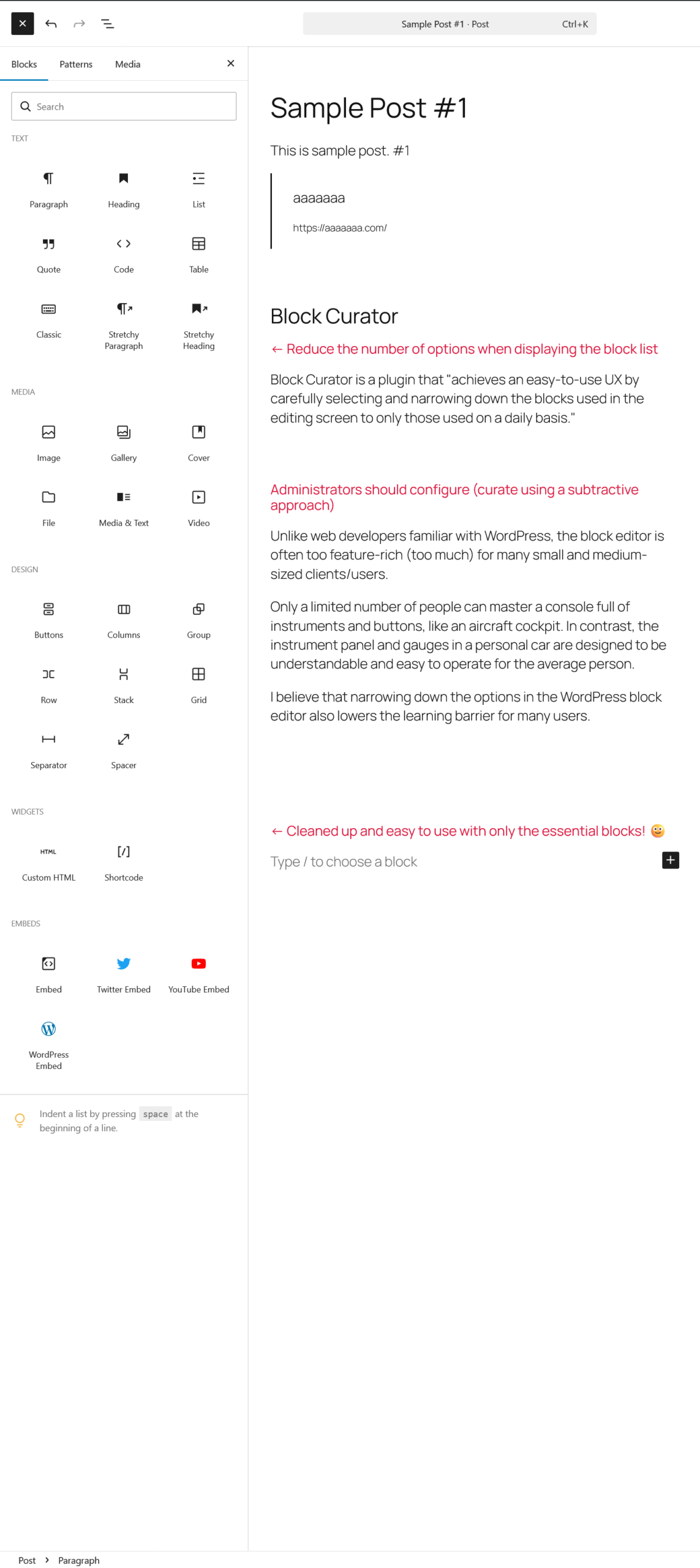
By narrowing down to only what you actually use …
The block list displayed on the editing screen becomes cleaner, easier to select, and easier to use. 🙂
こんなときにオススメ
- クライアントの担当者がWordPressに不慣れ
- 学習コストを抑えたい(覚える/覚えてもらうことを減らしたい)
- 日々の更新(お知らせ発信などの)定型業務では使う機能が限られる
- too much だろ、大杉だろ … と感じてるアナタに
WordPressに習熟したユーザーは、機能を使いこなして絞り込み検索で(例 para と入力 → 段落ブロック、col と入力 → カラム)を効率的に探して選択できますが、多くの一般ユーザーは、(スクリーンショットのように)全リストを表示させて、スクロールして探すという非効率を毎回強いられることにストレスを感じているケースも。
日々のお知らせ更新やブログなどでは全く使用しないブロックも大量にありますので、不必要なものを非表示にしておけば選びやすくなり、初心者にも優しいUI/UXになります🙂
Recommended for these situations
- The client’s user is unfamiliar with WordPress
- You want to reduce the learning cost (reduce what you/they need to learn)
- For routine tasks like daily updates (such as sending out announcements), the functions used are limited
- For those who feel it’s too much, too many …
Experienced WordPress users can efficiently find and select blocks using filter search (e.g., typing “para” -> paragraph block, typing “col” -> column), but many general users find it stressful to be forced to display the entire list and scroll through it every time (as in the screenshot above) .
There are also a large number of blocks that are never used for daily announcement updates or blog posts, so hiding unnecessary ones makes selection easier and creates a beginner-friendly UI/UX. 🙂
Download
動作要件
- WordPress 6.0 以上
- PHP 8.2 以上を推奨(最低 7.4 以上)
- Gutenberg ブロックエディター使用時
Requirements
- WordPress 6.4 or higher
- Reccomended: PHP 8.2 or higher (at least 7.4)
- Gutenberg Block Editor
インストール
- WordPress 管理画面 > プラグイン > プラグインを追加 > プラグインのアップロード >
- [参照] ボタンを押す > (PC内の) block-curator-v0.x.x.zip を選択してアップロード
- 「Block Curator」を有効化
- 設定 > Block Curator で設定を行う
Installation
- WordPress admin > Plugins > Add Plugin > Upload Plugin >
- [Browse] Button > Select (in your PC) block-curator-v0.x.x.zip and Upload
- Activate “16Deza Block Curator”
免責事項
- ご利用は自己責任でどうぞ。 * フリーウェア自己責任の原則 / GPLライセンス 自己責任
- 利用に伴ういかなる問題・損害についても、何ら補償はいたしかねます。
Disclaimer
- Use at your own risk. * Principles of Freeware and Self-Responsibility / GPL license
- I cannot provide any compensation for any problems or damages arising from use.
- Sorry, I am usually unable to reply to inquiries regarding usage. (only provide services to customers who directly request website creation and maintenance)
備考
- 当プラグインの開発には、AI(Claude)の手を大いに借りております。多謝🙇♂️
- ライセンスは GPL-2.0-or-later です。(プラグイン本体に明記)
- 著作権は当方:ジュウロクデザインに帰属します。(プラグイン本体に明記)
Notes
- This plugin was developed with the help of AI (Claude). Many thanks!🙇♂️
- License: GPL-2.0-or-later (As stated in the plugin)
- Copyright belongs to JuuRokuDesign. (As stated in the plugin)
サポート・問い合わせ
- 使用方法についてお問い合わせいただいても返信できない場合がほとんどとなります。悪しからずご了承ください。 (例外:直接のお客様のお問い合わせにはもちろん対応させていただきます)
- WordPress構築、トラブル相談、既存サイトの改修などに関する問い合わせ全般は大歓迎です!🙂 こちらのメールフォーム からご相談いただければ幸いです。
 こちらのメールフォームで